

The best tablets under $200 represent a genuinely compelling sweet spot in the market — where the hardware starts getting serious. You’re no longer limited to budget plastics and sluggish 2GB RAM configurations. At this price ceiling, you can find 2.5K displays, 9000mAh batteries, octa-core processors, Gemini AI integration, and even a Microsoft Windows tablet with 8GB RAM and 128GB SSD storage. The challenge is separating the options that deliver long-term value from those that look impressive on spec sheets but disappoint in daily use.
This guide covers the best tablets under $200 across two tiers — under $150 and under $200 — spanning Samsung, Xiaomi, Lenovo, Blackview, Microsoft, AOC, and budget Android brands. Whether you need a compact tablet for casual streaming, a productivity-focused 2-in-1 for work, or an educational device for kids, there’s a strong recommendation here for every use case and priority.

AT A GLANCE — Best Tablets Under $200 Quick Picks
- Best Overall Under $200: Xiaomi Redmi Pad 2
- Best Large Screen Under $200: Blackview MEGA 2
- Best Windows Tablet Under $200: Microsoft Surface Go 2
- Best Samsung Under $200: Samsung Galaxy Tab A9
- Best 2-in-1 Budget Tablet: Suicoey Android 16 10″
- Best Under $150 for Everyday Use: TCL TAB 8 Gen 2 — 8.7″
- Best Under $150 for Android Power: AOC M10
- Best Under $150 Compact Tablet: Samsung Galaxy Tab A11
- Best Under $150 for Kids: URAO Kids Tablet
- Best Under $150 for Portability: Lenovo Tab One
- Best Under $150 Budget 2-in-1: Lenovo Tab 10.1
How We Evaluated the Best Tablets Under $200
Identifying genuinely useful tablets at this price tier requires more than comparing processor specs. Our evaluation assessed the complete ownership experience.
- Display quality — Resolution, refresh rate, brightness (nits), Widevine L1 certification for HD streaming
- Processor performance — Chipset architecture, core count, real-world app responsiveness
- RAM and storage configuration — Physical vs virtual RAM distinction, base storage adequacy
- Battery life — Capacity (mAh), fast charging speed, realistic use hours vs manufacturer claims
- Software version and update commitment — Android version, years of security update support
- Connectivity — Wi-Fi generation (5 vs 6), Bluetooth version, GPS support
- Build quality — Metal vs plastic, display protection, port selection
- Value for included accessories — Keyboard, case, stylus, charger bundles
- Ecosystem and app access — Google Play certification, streaming service compatibility
Real-world usage patterns consistently reveal that display quality and RAM are the two dimensions where budget tablets most significantly affect daily satisfaction. A 2.5K display and 6GB of physical RAM deliver a meaningfully better daily experience than a 1280×800 panel with 2GB of physical RAM, regardless of what virtual RAM expansion figures suggest.
![[Top 5] Best Tablets Under $200 for 2026](https://i.ytimg.com/vi/EWxdAChMBE4/hqdefault.jpg)
Best Tablets Under $150 — Full Reviews

1.Samsung Galaxy Tab A11
Best For: Compact portable use, Android 15, GPS navigation, Samsung ecosystem integration

Product Highlights:
- 8.7-inch TFT display, 1340×800 (WXGA+), 90Hz refresh rate
- Android 15, One UI 7 — with updates coming
- MediaTek Helio G99 (6nm) octa-core processor, Mali-G57 MC2 GPU
- 4GB RAM / 64GB ROM, microSD expandable up to 2TB
- 5100mAh battery
- GPS, GLONASS, BeiDou, Galileo, QZSS — multi-system location
- Bluetooth 5.3 / Wi-Fi 802.11ac dual-band / USB Type-C 2.0
- 8MP rear + 5MP front cameras
- 3.5mm audio jack
The Samsung Galaxy Tab A11 earns its place among the best tablets under $200 sub-$150 tier through a combination of features that budget alternatives rarely deliver together — Android 15 with One UI 7, a Helio G99 6nm processor (genuinely capable for this price), multi-system GPS for accurate location tracking, and 2TB microSD expandability. The 90Hz refresh rate adds display smoothness that makes scrolling and video feel more premium than the resolution suggests.
GPS support — rare in the best tablets under $200 budget tier — makes it useful for navigation apps, geotagging, and outdoor use cases where other tablets require a phone for location. The international Latin American model has no US warranty and requires connecting to Wi-Fi during setup to finalize country settings. Charger is not included, which is worth factoring into the total purchase cost.
Reasons to Buy:
- Android 15 + One UI 7 with future updates
- Helio G99 6nm — strong mid-range processor
- Multi-system GPS — rare at this price tier
- 90Hz display for smooth scrolling
- 2TB microSD expandable storage
- Bluetooth 5.3 — modern wireless standard
Reasons to Avoid:
- No US warranty — international Latin American model
- Charger not included
- 1340×800 resolution — not Full HD
- Wi-Fi only — no cellular connectivity
- TFT display vs IPS competitors
2. Lenovo Tab One
Best For: Portable daily entertainment, Dolby Atmos audio, lightweight form factor, buyers wanting folio case included

Product Highlights:
- 8.7-inch HD display, 1340×800, 480 nits brightness
- Android 14 with 2 years of security patches
- MediaTek Helio G85 processor, 60Hz refresh rate
- 4GB RAM / 64GB storage (microSD expandable implied)
- Up to 12.5 hours of YouTube streaming battery life
- 15W faster charging than previous Lenovo generation
- Dual Dolby Atmos speakers
- Google Kids Space pre-enabled
- Folio case included in the box
- Weight: under 1 pound / 211 x 124.8 x 8.5mm
The Lenovo Tab One is the most lifestyle-complete package among the best tablets under $200 at the sub-$150 tier — it ships with a folio case, delivers 12.5 hours of YouTube streaming, and weighs under a pound for genuine pocketable portability. Dual Dolby Atmos speakers at this price tier are a meaningful audio upgrade over the single-speaker alternatives that dominate budget Android tablets.
The 15W charging speed improvement over the previous generation reduces time tethered to a cable, and Google Kids Space integration makes it immediately ready for child use without additional setup. The Helio G85 processor handles streaming, browsing, and light gaming smoothly at 60Hz. The 60Hz refresh rate is the main display limitation versus 90Hz alternatives in this guide.
Reasons to Buy:
- 12.5-hour YouTube streaming battery — exceptional endurance
- Folio case included — complete out-of-box
- Dual Dolby Atmos speakers
- Under 1 pound — genuinely portable
- Google Kids Space pre-enabled
- 15W fast charging
- 2 years security patches
Reasons to Avoid:
- 60Hz only — lower than 90Hz alternatives
- Helio G85 — less capable than Helio G99 (Samsung Tab A11)
- 64GB storage — fills quickly without expansion
- No GPS
- 480 nits — adequate but not bright for outdoor use
3. Suicoey P30 Android 16 10-inch 2-in-1 Tablet
Best For: Budget productivity users, 2-in-1 work setup, Gemini AI, 256GB storage, keyboard + mouse + stylus bundle

Product Highlights:
- Android 16 + Gemini AI built-in
- 10-inch 1280×800 HD display, Widevine L1 certified
- 26GB RAM (virtual expanded) / 256GB internal storage / 2TB expandable
- 8000mAh battery for all-day heavy usage
- 13MP rear + 5MP front cameras
- 5G Wi-Fi + Bluetooth 5.0
- GPS support
- Package includes: tablet, keyboard, mouse, stylus, black protective case, USB charger, Type-C cable, user manual
The Suicoey P30 is the most complete productivity package in the best tablets under $200 sub-$150 comparison — no other tablet in this guide ships with a keyboard, mouse, stylus, and protective case in a single bundle. The 256GB internal storage is the largest in the under-$150 tier, and Widevine L1 certification ensures Netflix, Disney+, and Prime Video stream in full HD rather than degraded quality. Gemini AI built-in adds real-time language translation, content summarization, and creative assistance directly from the tablet.
The 8000mAh battery provides genuine all-day endurance for travel, school, and work sessions. It’s important to note the 26GB RAM figure includes significant virtual expansion — the physical RAM is lower. The 1280×800 resolution is adequate for work tasks but not cinematic for media consumption. With 85 buyer reviews, long-term reliability data is still building.
Reasons to Buy:
- Keyboard + mouse + stylus + case bundle included
- 256GB internal storage — largest in this tier
- Gemini AI built-in for productivity
- Widevine L1 — HD streaming certified
- 8000mAh battery — all-day endurance
- Android 16 — newest OS in this guide
- GPS + 5G Wi-Fi
Reasons to Avoid:
- 26GB RAM is virtual expanded — physical RAM is lower
- 1280×800 resolution — basic display for a productivity device
- Only 85 buyer reviews — limited reliability data
- Suicoey is a lesser-known brand — long-term support uncertain
- Keyboard quality at this price tier may feel basic
4. AOC M10 10.1-inch Android 16 Tablet
Best For: Smooth scrolling, Android 16, GPS navigation, Widevine L1 HD streaming, face unlock, slim metal build

Product Highlights:
- Android 16, UNISOC T7200 octa-core (2×A75 + 6×A55, 12nm), Mali-G57 GPU
- 10.1-inch IPS 1280×800, 120Hz refresh rate, 450 nits brightness
- 4GB RAM (expandable to 16GB virtual) / 128GB internal storage / 1TB microSD
- Widevine L1 certified — HD streaming on Netflix, Disney+, Prime Video
- 6000mAh battery
- Multi-system GPS: GPS/GLONASS/Galileo/BeiDou/QZSS
- Face unlock
- Bluetooth 5.0 / Wi-Fi
- 5MP front + 8MP rear AF cameras
- 8mm slim metal body
- Blue Light Filter + Paper-like Reading Mode
The AOC M10 is the most feature-complete budget tablet under $150 for users who prioritize display smoothness and streaming quality — 120Hz is the highest refresh rate in this entire best tablets under $200 guide, and Widevine L1 certification ensures every major streaming service plays at its intended quality. The slim 8mm metal body gives it a premium physical presence that plastic alternatives at this price lack. Multi-system GPS covering five satellite networks delivers reliable navigation accuracy.
450-nit brightness keeps the display readable in most indoor and shaded outdoor settings, and the Paper-like Reading Mode plus Blue Light Filter add eye comfort for extended reading or study sessions.
Reasons to Buy:
- 120Hz refresh rate — smoothest display in this guide
- Widevine L1 — HD Netflix, Disney+, Prime Video certified
- 8mm slim metal body
- Multi-system GPS (5 satellite networks)
- Face unlock for quick access
- 6000mAh battery
- Blue Light Filter + Paper Mode for reading
Reasons to Avoid:
- Only 34 buyer reviews — limited reliability data
- AOC is less established in tablets than Samsung or Lenovo
- 4GB physical RAM only — virtual expansion to 16GB is slower
- 1280×800 — not Full HD despite premium features
5. URAO Kids 10-inch Android 16 Tablet
Best For: Children ages 6-12, parents wanting Android 16 with parental controls, low blue light display, fast charging

Product Highlights:
- Android 16 operating system — latest in this guide for kids
- Octa-core 2.0GHz processor — 40% faster than standard
- 20GB RAM (virtual expanded) / 64GB ROM / 1TB microSD support
- 10-inch IPS 1280×800 HD touchscreen, 323 PPI
- Low blue light technology + professional reading mode
- Built-in parental controls — custom profiles, screen time, app management, safe web browsing
- 6-hour battery life / 3-day standby / 1.5-hour fast charging via USB Type-C
- Food grade silicone case with adjustable bracket included
- Lifetime technical service support + 30-day free exchange
- Google Play pre-installed — full app access
The URAO Kids tablet stands out among the best tablets under $200 kids category for combining Android 16 (the newest OS in this guide), a low blue light IPS display designed specifically for children’s eye health, and comprehensive built-in parental controls — all with a food-grade silicone protective case and adjustable viewing bracket included in the box. The 20GB RAM claim includes significant virtual expansion, so real-world performance aligns with a 4-6GB physical RAM configuration — adequate for the educational app and streaming use case.
The 4.7-star rating from 320 buyers provides reasonable confidence, and lifetime technical service support is a meaningful post-purchase commitment for parents who want ongoing help configuring parental controls and app settings. Fast charging at 1.5 hours keeps the tablet ready for daily school and home use without extended downtime.
Reasons to Buy:
- Android 16 — safest, most current OS for kids
- Low blue light IPS display — eye protection for children
- Comprehensive parental controls — profiles, screen time, safe browsing
- Food grade silicone case + adjustable bracket included
- 1.5-hour fast charging
- Google Play pre-installed — full educational app access
- Lifetime technical service support
- 4.7-star rating from 320 buyers
Reasons to Avoid:
- 20GB RAM is virtual expanded — physical RAM is lower
- 6-hour battery — shorter than some adult tablet alternatives
- 64GB base storage fills quickly with educational apps and videos
- No GPS
- 1280×800 resolution — not Full HD
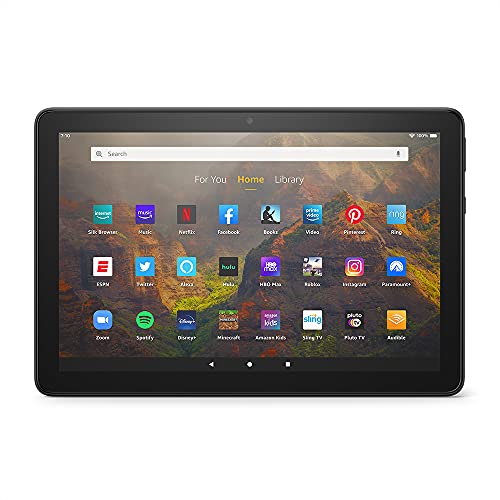
6. Amazon Fire HD 10
Best For: Prime members, streaming enthusiasts, Alexa smart home users, light productivity

Product Highlights:
- 10.1-inch 1080p Full HD display — over 2 million pixels, ~20% brighter than Samsung Galaxy Tab A8
- Octa-core processor + 3GB RAM for responsive everyday performance
- 12-hour battery life for all-day use
- 32GB or 64GB storage / up to 1TB microSD expandable
- Alexa built-in with hands-free on/off toggle
- Split-screen multitasking for two compatible apps simultaneously
- Strengthened aluminosilicate glass — 2x more durable than Samsung Galaxy Tab A8 in tumble testing
- Fire OS — Amazon Appstore (Google Play not supported)
- Thinner and lighter than previous Fire HD 10 generation
- Apps available: Netflix, Hulu, Facebook, Instagram, TikTok, Zoom, Microsoft Office, OneNote, Dropbox
The Amazon Fire HD 10 delivers a 1080p Full HD display at 10.1 inches — the only Fire tablet in this guide with Full HD resolution — making it the strongest choice for streaming Prime Video, Netflix, and Hulu content at genuine HD quality. The octa-core processor and 3GB RAM keep everyday navigation and multitasking responsive, and the 12-hour battery comfortably handles a full day of mixed use without reaching for a charger. Split-screen support adds a light productivity layer that smaller Fire tablets don’t offer, enabling side-by-side app combinations like Prime Video and Messenger or OneNote and a browser.
Alexa hands-free control with a dedicated on/off toggle makes it a natural smart home companion — useful for video calls via Zoom, setting reminders, and managing connected devices without touching the screen. The aluminosilicate glass display adds meaningful drop durability at a price point where screen breakage on competing tablets is common. As with all Fire tablets, Google Play is absent — the Amazon Appstore covers major streaming and productivity apps, but the broader Google ecosystem is not accessible without sideloading.
Reasons to Buy:
- 1080p Full HD — sharpest display in the Fire tablet lineup
- 12-hour battery — all-day endurance
- Alexa hands-free with toggle — smart home integration
- Split-screen multitasking — more productive than entry Fire models
- 2x durability vs comparable Samsung Tab in tumble testing
- Microsoft Office, OneNote, Dropbox available for light productivity
- 1TB microSD expandable storage support
Reasons to Avoid:
- No Google Play Store — Amazon Appstore only
- Currently unavailable — newer model exists (check latest Fire HD 10)
- 3GB RAM — adequate but not future-proof for heavy multitasking
- Lockscreen ads on the standard ad-supported model
- Fire OS — less flexible than standard Android
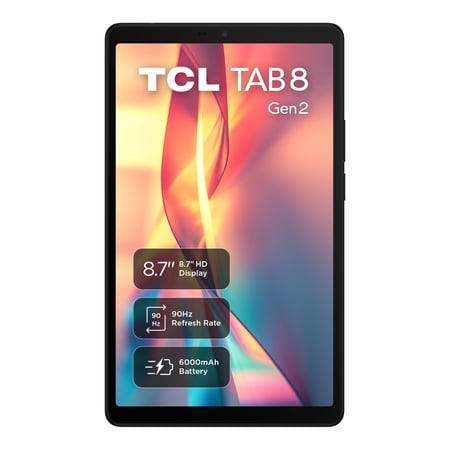
7. TCL TAB 8 Gen 2 8.7-inch
Best For: 90Hz streaming and gaming, 6000mAh battery, Eye Comfort Mode, everyday portable use

Product Highlights:
- 8.7-inch HD display, 90Hz refresh rate, Eye Comfort Mode
- Android 14 operating system
- Octa-core 2.0GHz processor, 4GB RAM, 64GB storage, 1TB expandable
- 6000mAh all-day battery
- Dual speakers for audio depth
- Compact form factor for travel, school, and family use
The TCL TAB 8 Gen 2 delivers one of the most balanced everyday use experiences in the best tablets under $200 sub-$150 category — a 90Hz display that makes scrolling and video feel noticeably smoother than 60Hz alternatives, a 6000mAh battery that genuinely handles all-day use, and an Eye Comfort Mode that reduces blue light strain for extended reading or study. The compact 8.7-inch form factor sits comfortably in one hand and fits easily into most bags without feeling like a burden.
TCL is an established consumer electronics brand with strong quality consistency in this price tier. The 4.4-star rating from 107 buyers provides good early confidence in the hardware and software experience. The 64GB storage and 1280×800 display resolution are the practical limitations for users who plan to download significant local content or stream high-resolution media.
Reasons to Buy:
- 90Hz display — smooth scrolling and video
- 6000mAh battery — all-day endurance
- Eye Comfort Mode — blue light reduction
- 1TB microSD expandable storage
- Dual speakers
- TCL brand consistency
- Compact 8.7-inch portable size
Reasons to Avoid:
- 64GB base storage — limited without SD card
- 1280×800 resolution — not Full HD
- No GPS listed
- 107 buyer reviews — moderate confidence sample
- No Widevine L1 certification listed
Best Tablets Under $200 — Full Reviews
1. Samsung Galaxy Tab A9 (SM-X110)
Best For: Samsung ecosystem users, 15W fast charging, 5100mAh battery, compact 8.7-inch Samsung build quality

Product Highlights:
- 8.7-inch TFT LCD, 800×1340 pixels (~179 ppi), 81.7% screen-to-body ratio
- 4GB RAM / 64GB storage
- 5100mAh battery with 15W wired fast charging
- 8MP rear camera with autofocus
- Wi-Fi only (no cellular)
- USB Type-C
- 15W wall charger included from seller bundle
- Samsung brand reliability and ecosystem
The Samsung Galaxy Tab A9 is the entry point into Samsung’s current tablet lineup for the best tablets under $200 category, and it delivers the brand trust, build quality, and ecosystem integration that budget Android alternatives can’t match. Samsung’s One UI tablet interface is one of the most polished Android tablet experiences available — intuitive navigation, Samsung DeX-adjacent features, and seamless integration with Samsung phones, Galaxy Buds, and other Samsung devices.
The 15W charging is practical, and Samsung’s ongoing software support timeline provides more long-term update confidence than lesser-known brands. The 179 ppi display density is adequate but not impressive — at 8.7 inches and 800×1340, the display is functional rather than visually sharp for media consumption. For Samsung ecosystem buyers who want brand reliability over raw specification value, the Tab A9 is the right choice in the best tablets under $200 comparison.
Reasons to Buy:
- Samsung brand reliability + ecosystem integration
- One UI tablet interface — polished Android experience
- 15W fast charging + wall charger included in bundle
- 5100mAh battery
- Samsung software support commitment
- 8MP autofocus rear camera
- 1,405 buyer reviews — 4.5 stars
Reasons to Avoid:
- 800×1340 at 8.7 inches — 179 ppi is not sharp for media
- TFT LCD — lower quality than IPS
- 64GB storage — limited without SD expansion
- Wi-Fi only — no cellular connectivity
- No GPS listed
2. Xiaomi Redmi Pad 2
Best For: Display quality, streaming enthusiasts, buyers wanting 2.5K resolution and 9000mAh battery in one package

Product Highlights:
- 11-inch 2.5K IPS display, 2560×1600 pixels, 274 ppi, 16:10 aspect ratio
- Up to 90Hz high refresh rate
- 500 nits typical brightness / 600 nits Outdoor mode
- MediaTek Helio G100-Ultra (6nm) octa-core processor
- 4GB RAM / 128GB storage
- 9000mAh battery — among the largest in the best tablets under $200 category
- Quad speakers, Hi-Res Audio, Dolby Atmos
- Android 15 operating system
- Wi-Fi 5 / Bluetooth 5.3
- 8MP rear + 5MP front cameras
- TÜV Rheinland Low Blue Light + Flicker Free + Circadian Friendly certified
- Metal unibody design — Graphite Gray, Mint Green, Lavender Purple
The Xiaomi Redmi Pad 2 is the standout recommendation in the entire best tablets under $200 guide. No other tablet at this price ceiling delivers a 2.5K display at 274 ppi, a 9000mAh battery, quad Dolby Atmos speakers, TÜV Rheinland eye safety certification, and a Helio G100-Ultra 6nm processor simultaneously. The display quality alone — at 2560×1600 with 90Hz and 600 nits outdoor brightness — competes with tablets priced significantly higher.
TÜV Rheinland triple certification (Low Blue Light, Flicker Free, Circadian Friendly) is a genuine differentiator for users who use their tablet for extended reading, study, or work. The 9000mAh battery provides real multi-day endurance under typical use. Dolby Atmos quad speakers deliver audio that fills a room — meaningful for streaming movies and YouTube content. The 4.7-star rating from 1,533 buyers provides the strongest buyer confidence in the best tablets under $200 guide.
Reasons to Buy:
- 2.5K 2560×1600 display — best resolution in this guide
- 9000mAh battery — outstanding endurance
- Dolby Atmos quad speakers — premium audio
- TÜV Rheinland Low Blue Light + Flicker Free + Circadian Friendly
- Helio G100-Ultra 6nm — strong performance
- Android 15 — current OS
- Metal unibody design
- 4.7 stars from 1,533 buyers — exceptional confidence
Reasons to Avoid:
- Wi-Fi only — no cellular or GPS
- 4GB RAM — adequate but not expansive for heavy multitasking
- No Widevine L1 listed — verify HD streaming compatibility before purchasing
- Wi-Fi 5 only — not Wi-Fi 6
3. Blackview MEGA 2 12-inch
Best For: Large-screen entertainment, creative work with stylus, gaming, Gemini AI productivity, 120Hz display

Product Highlights:
- 12-inch 2.4K FHD+ IPS display, 120Hz refresh rate
- Android 15 + Gemini AI optimization
- 24GB RAM (8GB + 16GB virtual) / 256GB ROM / 2TB expandable
- Unisoc T615 octa-core processor
- 9000mAh battery + 33W fast charging
- Stylus + protective case included
- 5G Wi-Fi + SIM card slot + GPS + Bluetooth
- Widevine L1 certified — HD streaming on Netflix, Disney+, Prime Video
- Google GMS certified
The Blackview MEGA 2 delivers the most comprehensive feature package in the best tablets under $200 category — a 12-inch 2.4K display at 120Hz, 256GB storage, a 9000mAh battery with 33W fast charging, Gemini AI integration, Widevine L1 HD streaming certification, SIM card support for cellular connectivity, GPS navigation, and both a stylus and protective case included in the box. At this price tier, that combination of features is genuinely difficult to argue against.
The 120Hz refresh rate combined with a 12-inch 2.4K panel creates an immersive entertainment and creative experience. Gemini AI enables real-time translation, content summarization, and creative assistance. The 33W fast charging on a 9000mAh battery is the fastest charging in this guide — reducing downtime significantly compared to standard 15W or 18W charging. The 24GB RAM figure includes 16GB virtual expansion, so performance reflects closer to 8GB physical RAM in practice.
Reasons to Buy:
- 12-inch 2.4K 120Hz — largest, smoothest display in this guide
- Widevine L1 certified — HD streaming guaranteed
- 256GB storage — ample for apps, games, and media
- 33W fast charging — fastest in this guide
- Stylus + case included
- Gemini AI built-in
- SIM card slot + GPS + 5G Wi-Fi
- 9000mAh battery
Reasons to Avoid:
- 24GB RAM includes 16GB virtual — 8GB physical only
- Unisoc T615 — less established processor vs MediaTek alternatives
- 57 buyer reviews — limited reliability data despite positive rating
- 12-inch size — less portable than 8.7 or 10-inch alternatives
- Heavier and bulkier for handheld reading
4. Microsoft Surface Go 2 (Renewed)
Best For: Windows 11 Pro users, laptop replacement seekers, productivity workflows, students needing full desktop OS

Product Highlights:
- 10.5-inch PixelSense 10-point touch display, 1920×1280 pixels, 216 ppi
- Intel Pentium 4425Y (1.70GHz) processor
- 8GB RAM / 128GB SSD storage
- Windows 11 Professional
- Integrated Intel HD Graphics 615
- MicroSD card reader (UHS-I)
- USB-C 3.5mm headphone jack, Surface Connect port, Surface Type Cover port
- Up to 9 hours battery life
- Lightest Surface — 1.15 lbs
- Amazon Renewed — Microsoft Refurbished standard
The Microsoft Surface Go 2 renewed is the only Windows tablet in this best tablets under $200 guide — and that distinction matters significantly for users who need a full desktop OS rather than Android or iPad OS. Windows 11 Pro provides complete Microsoft Office compatibility, browser extensions, remote desktop, and professional software access that no Android tablet in this comparison can deliver. The 8GB RAM and 128GB SSD configuration delivers workable Windows performance — adequate for document editing, web browsing, email, and video calls.
The 1920×1280 PixelSense display at 216 ppi is the sharpest non-2.5K display in this guide, and 10-point touch support makes tablet use fluid. As a renewed/Microsoft Refurbished unit, condition will vary — Type Cover keyboard and other accessories are sold separately, which adds significant cost for users who want a full laptop-replacement setup.
Reasons to Buy:
- Windows 11 Pro — full desktop OS
- 8GB RAM + 128GB SSD — strong Windows performance
- 1920×1280 PixelSense display — sharp and touch-accurate
- 9-hour battery life
- Microsoft brand refurbished reliability
- 1.15 lbs — lightest tablet in this guide
- USB-C + Surface Connect + headphone jack
Reasons to Avoid:
- Type Cover keyboard sold separately — significant additional cost
- Renewed — condition varies
- Intel Pentium 4425Y — limited for demanding Windows applications
- Only 15 buyer reviews — insufficient reliability data at this listing
- 4.0-star rating — moderate satisfaction
- No GPS
- Windows on tablet has a learning curve vs Android touch optimization
5. Xiaomi Redmi Pad SE 8.7-inch
Best For: Compact daily use, 128GB storage at 8.7-inch size, Xiaomi HyperOS experience, portable media consumption

Product Highlights:
- 8.7-inch LCD, 800×1340 resolution
- Xiaomi HyperOS operating system
- Octa-core 2.0GHz processor
- 4GB RAM / 128GB storage
- 6650mAh battery
- Bluetooth 5.3
- 5MP rear camera / 8MP front camera (note: spec listing shows front/rear reversed from standard — verify at purchase)
- Wi-Fi only — no SIM card
- Global version — Global ROM
The Xiaomi Redmi Pad SE positions itself as the compact alternative to the Redmi Pad 2 — a smaller 8.7-inch form factor with 128GB storage (the same as the larger Pad 2 model) at a more accessible price. Xiaomi’s HyperOS provides a clean, refined Android interface that competes with Samsung’s One UI in terms of daily polish. The 6650mAh battery provides strong endurance for the 8.7-inch display size.
The 800×1340 display resolution is a practical limitation — at 8.7 inches it produces adequate pixel density for everyday use but isn’t comparable to the 2.5K Redmi Pad 2 for media sharpness. At 41 buyer reviews, reliability data is limited, and buyers should verify camera orientation specifications at purchase. For users who specifically want a compact Xiaomi tablet with 128GB storage, the Pad SE fills that need.
Reasons to Buy:
- 128GB storage — more than most 8.7-inch competitors
- Xiaomi HyperOS — refined Android tablet experience
- 6650mAh battery — strong for 8.7-inch size
- Bluetooth 5.3 — modern connectivity
- Global version — broader software compatibility
- Compact and portable form factor
Reasons to Avoid:
- 800×1340 resolution — not Full HD
- Only 41 buyer reviews — limited reliability data
- No GPS
- Wi-Fi only — no cellular
- Camera specs listing appears inconsistent — verify at purchase
- No 90Hz or 120Hz refresh rate listed
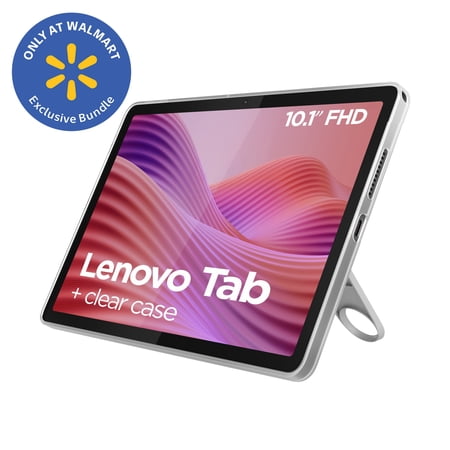
6. Lenovo Tab 10.1 FHD
Best For: Full HD display quality, 4-year security update commitment, Dolby Atmos audio, 128GB storage productivity

Product Highlights:
- 10.1-inch FHD display, 1920×1200 pixels, 60Hz
- MediaTek Helio G80 (or G85 per listing note — verify at purchase) octa-core processor
- 4GB RAM / 128GB storage / 1TB expandable
- Dolby Atmos dual stereo audio
- 5100mAh battery, 15W rapid charging
- Android 14 — 2 OS upgrades + 4 years security updates
- All-metal ergonomic round-edge design
- Compatible with Lenovo Clear Case, Folio Case, and Play Suite accessories
- Wi-Fi 5 / Bluetooth 5.0
The Lenovo Tab 10.1 FHD is the most complete display-and-software combination in the best tablets under $200 under-$200 tier — 1920×1200 Full HD resolution on a 10.1-inch panel, combined with a 4-year security update commitment and 2 OS upgrade guarantee, provides long-term usability assurance that most budget tablet brands cannot credibly offer. For buyers who will use their tablet for document work, reading, and streaming over multiple years, Lenovo’s software support commitment is a meaningful trust signal.
Dolby Atmos dual stereo audio adds audio depth for media consumption, and the all-metal ergonomic design gives it a premium feel that plastic alternatives lack. The 128GB storage is adequate for most daily use without requiring immediate expansion. The 5100mAh battery with 15W rapid charging handles daily use with overnight charging routine.
Reasons to Buy:
- 1920×1200 Full HD — sharpest 10-inch display in this tier
- 4 years security updates + 2 OS upgrades — best support commitment
- Dolby Atmos dual stereo audio
- 128GB storage — generous base configuration
- All-metal ergonomic design
- 15W rapid charging
- 4.2 stars from 598 buyers — solid confidence
Reasons to Avoid:
- 60Hz only — lower than 90Hz and 120Hz alternatives
- 5100mAh — smaller battery vs 9000mAh alternatives
- No GPS
- Wi-Fi 5 — not Wi-Fi 6
- Processor specification inconsistency in listings — verify at purchase
Model Comparison Table — Best Tablets Under $200
| Tablet | Display | RAM/Storage | OS | Battery | GPS | Refresh Rate | Best For |
|---|---|---|---|---|---|---|---|
| Samsung Galaxy Tab A11 | 8.7″ 1340×800 | 4GB/64GB | Android 15 | 5100mAh | Yes | 90Hz | Compact Samsung + GPS |
| Lenovo Tab One | 8.7″ 1340×800 | 4GB/64GB | Android 14 | Not specified | No | 60Hz | Portability + Dolby Atmos |
| Suicoey Android 16 10″ | 10″ 1280×800 | 26GB/256GB | Android 16 | 8000mAh | Yes | Not specified | 2-in-1 productivity bundle |
| AOC M10 10.1″ | 10.1″ 1280×800 | 4GB/128GB | Android 16 | 6000mAh | Yes | 120Hz | Android 16, 120Hz, metal body |
| URAO Kids 10″ | 10″ 1280×800 | 20GB/64GB | Android 16 | Not specified | No | Not specified | Kids ages 6-12, parental controls |
| TCL TAB 8 Gen 2 | 8.7″ HD | 4GB/64GB | Android 14 | 6000mAh | No | 90Hz | 90Hz streaming, 6000mAh budget |
| Samsung Galaxy Tab A9 | 8.7″ 800×1340 | 4GB/64GB | Android | 5100mAh | No | Not specified | Samsung brand, 15W charging |
| Xiaomi Redmi Pad 2 | 11″ 2560×1600 | 4GB/128GB | Android 15 | 9000mAh | No | 90Hz | Best display + battery combo |
| Blackview MEGA 2 | 12″ 2.4K | 24GB/256GB | Android 15 | 9000mAh | Yes | 120Hz | Large screen, stylus, gaming |
| Microsoft Surface Go 2 | 10.5″ 1920×1280 | 8GB/128GB | Windows 11 Pro | ~9 hours | No | Not specified | Windows productivity |
| Xiaomi Redmi Pad SE | 8.7″ 800×1340 | 4GB/128GB | HyperOS | 6650mAh | No | Not specified | Compact Xiaomi, 128GB storage |
| Lenovo Tab 10.1 FHD | 10.1″ 1920×1200 | 4GB/128GB | Android 14 | 5100mAh | No | 60Hz | FHD display, 4-year security |
Key Comparisons — What Matters When Buying the Best Tablets Under $200
Display Quality: Resolving the Resolution Question
Display resolution is where the best tablets under $200 diverge most significantly from sub-$100 alternatives:
Best displays in this guide (sharpest to most basic):
- Xiaomi Redmi Pad 2 — 2560×1600 at 11 inches (274 ppi) — 2.5K sharpness
- Blackview MEGA 2 — 2.4K FHD+ at 12 inches — 2.4K with 120Hz
- Microsoft Surface Go 2 — 1920×1280 at 10.5 inches (216 ppi) — sharp PixelSense
- Lenovo Tab 10.1 FHD — 1920×1200 at 10.1 inches — Full HD
- Samsung Galaxy Tab A11 — 1340×800 at 8.7 inches — WXGA+
- TCL TAB 8 Gen 2 — HD at 8.7 inches
- Samsung Galaxy Tab A9 — 800×1340 at 8.7 inches — 179 ppi
For streaming, reading, and general media, the Xiaomi Redmi Pad 2’s 2.5K resolution at 274 ppi is the strongest value proposition in the best tablets under $200 guide — comparable to tablets priced well above this ceiling.
The RAM Reality: Physical vs Virtual
Every budget tablet in the best tablets under $200 comparison that advertises unusually high RAM figures (20GB, 24GB, 26GB, 30GB) uses a combination of physical RAM and virtual RAM expansion — where storage is repurposed as slower temporary memory. Understanding the split:
| Tablet | Advertised RAM | Estimated Physical RAM |
|---|---|---|
| Suicoey P30 | 26GB | ~6GB physical |
| Blackview MEGA 2 | 24GB | 8GB physical |
| URAO Kids | 20GB | ~4-6GB physical |
| AOC M10 | 4GB (expandable to 16GB) | 4GB physical |
| Xiaomi Redmi Pad 2 | 4GB | 4GB physical |
| Samsung Galaxy Tab A11 | 4GB | 4GB physical |
| Microsoft Surface Go 2 | 8GB | 8GB physical |
Physical RAM is what matters for true performance. The Surface Go 2’s 8GB physical RAM is the most capable multitasking configuration in this guide.
Battery Life: How Long Will It Actually Last?
Battery endurance from mixed daily use (streaming, browsing, messaging):
- Xiaomi Redmi Pad 2 — 9000mAh / 2-3 days realistic moderate use
- Blackview MEGA 2 — 9000mAh + 33W fast charge / 2-3 days
- Suicoey P30 — 8000mAh / ~1.5-2 days
- URAO Kids — 6 hours screen-on / ~1 day typical use
- TCL TAB 8 Gen 2 — 6000mAh / ~1.5 days moderate use
- AOC M10 — 6000mAh / ~1.5 days
- Lenovo Tab One — 12.5-hour YouTube streaming claim
- Samsung Galaxy Tab A9 — 5100mAh / ~1 day typical use
- Microsoft Surface Go 2 — ~9 hours Windows use
Widevine L1 Certification: Essential for Streaming Quality
Widevine L1 is a digital rights management certification that determines whether a tablet can stream Netflix, Disney+, Amazon Prime Video, and other services in Full HD or 4K. Without it, streaming services default to lower resolution (often 480p or 720p) regardless of display capability.
Widevine L1 confirmed in this guide:
- Blackview MEGA 2 — confirmed
- Suicoey P30 — confirmed
- AOC M10 — confirmed
Verify before purchasing:
- Xiaomi Redmi Pad 2 — not specified in listing
- Lenovo Tab One — not specified
- Samsung Galaxy Tab A9 — not specified
For streaming-first buyers, Widevine L1 confirmation should be verified before purchase on any tablet in the best tablets under $200 comparison.
Android vs Windows: Which OS for Your Use Case?
The Microsoft Surface Go 2 is the only Windows tablet in this guide. The choice between Android and Windows at this price tier resolves to one question: what software do you need to run?
Choose Android if:
- App-based workflows (streaming, social media, casual productivity)
- Touch-first experience
- Google ecosystem (Google Docs, Drive, Gmail, Photos)
- Gaming from Google Play Store
- Price-to-battery-life ratio matters
Choose Windows 11 Pro if:
- Microsoft Office native applications matter
- Remote desktop or corporate IT environment access
- Browser extensions required
- Linux compatibility needed
- Desktop-class multitasking with windows and taskbar
Conclusion
The best tablets under $200 have genuinely evolved to where the decision isn’t about accepting compromise — it’s about matching the right hardware to your specific use case. For most buyers who want the best overall value in the best tablets under $200 category, the Xiaomi Redmi Pad 2 is the clear recommendation: a 2.5K display, 9000mAh battery, quad Dolby Atmos speakers, and TÜV Rheinland eye safety certification at a price that competes with tablets twice its cost in display and audio quality.
For buyers who need large-screen productivity with stylus support, the Blackview MEGA 2 12-inch 2.4K 120Hz display with 33W fast charging and included accessories represents exceptional value. For Windows users who need a full desktop OS for work or study, the Microsoft Surface Go 2 renewed remains the only genuine laptop-replacement option under $200. And for families seeking a safe, current, feature-complete kids tablet, the URAO Kids 10-inch with Android 16 and lifetime technical support earns the recommendation for the best tablets under $200 for children’s use.
