


WhatsApp backup encryption is one of the most important — and most misunderstood — privacy features available to Android users on the platform today. Most people know that WhatsApp uses end-to-end encryption for messages in transit. Far fewer understand that this encryption has historically not extended to backups stored on Google Drive, and that WhatsApp backup encryption is a separate, optional feature that must be deliberately enabled to protect stored chat data.
WhatsApp backup encryption addresses a genuine gap in data protection. When your chats are backed up to Google Drive without encryption, the backup file sits on Google’s servers in a format that — while not completely open — does not carry the same protection as your messages during transmission. WhatsApp backup encryption closes that gap by applying end-to-end encryption to the backup file itself, so that only you — with your specific key or password — can ever access its contents.
Understanding WhatsApp backup encryption properly means understanding what it protects, what it does not protect, how the key system works, and what the consequences of losing that key actually are.
Why WhatsApp Backup Encryption Exists
To understand why WhatsApp backup encryption matters, you need to understand the problem it solves. WhatsApp’s core messaging uses the Signal Protocol — one of the strongest end-to-end encryption implementations available. Messages between users are encrypted on the sender’s device and decrypted only on the recipient’s device. WhatsApp’s own servers never hold readable copies of your messages.
The problem historically was that this encryption applied only to messages in transit. The moment a message was backed up to Google Drive, it left the protection of the Signal Protocol. Google Drive backups were stored with Google’s standard encryption — which protects the file from external attackers but means Google, under certain legal circumstances, could theoretically access the content.
WhatsApp backup encryption extends the end-to-end protection from the messaging layer to the storage layer. With it enabled, the backup file on Google Drive is encrypted with a key that Meta and Google do not hold. Only the person with the correct password or 64-digit key can decrypt and restore from that backup.
How WhatsApp Backup Encryption Works Technically
WhatsApp backup encryption uses a 256-bit AES encryption standard applied to the entire backup file before it is uploaded to Google Drive. The encryption key is generated during the setup process and is tied specifically to your WhatsApp account and the password you choose.
The Two Key Options: Password and 64-Digit Key
WhatsApp backup encryption offers two methods for securing and accessing the encryption key.
Password method: You create a personal password of your choice. This password is used to derive the encryption key that protects your backup. When you restore on a new device, you enter this password and WhatsApp decrypts the backup using the derived key. The password is not stored by WhatsApp or Google — only you know it.
64-digit encryption key method: WhatsApp generates a random 64-digit key that directly serves as the encryption key. This method does not use a password — instead, you receive a sequence of 64 characters that you must store safely. When restoring, you enter this exact sequence. There is no recovery option if it is lost.
Both methods produce the same level of encryption protection. The difference is in how you authenticate to access the backup. Passwords are more memorable but potentially less secure if chosen poorly. The 64-digit key is cryptographically stronger but completely dependent on safe storage of that key.

Where the Encryption Key Is Stored
This is the critical point that separates WhatsApp backup encryption from other backup protection systems. The encryption key is stored in a hardware security module — a dedicated secure hardware system — managed through WhatsApp’s backup key vault. WhatsApp designed this system so that the key is accessible only when you provide your correct password or 64-digit key during a restore.
Neither WhatsApp nor Meta holds your password. Neither Google nor Meta holds your 64-digit key if you chose that method. The key vault holds an encrypted version of the key that can only be unlocked by providing the correct authentication — which only you possess.
How to Enable WhatsApp Backup Encryption on Android
WhatsApp backup encryption is not enabled by default. You must manually activate it through the app settings.
Step-by-Step Setup Process
Open WhatsApp on your Android device. Tap the three-dot menu in the top right corner and select Settings. Navigate to Chats, then Chat Backup. Look for the End-to-End Encrypted Backup option at the bottom of the backup settings screen. Tap Turn On.
WhatsApp presents you with the choice between creating a password or using the 64-digit key. If you choose a password, enter it twice to confirm. If you choose the 64-digit key, WhatsApp displays the key and provides options to copy or save it — do this immediately and store it somewhere secure and separate from your phone.
After confirming your choice, WhatsApp creates a new encrypted backup and uploads it to Google Drive. The process may take several minutes depending on your backup size and internet connection speed. Once complete, all future backups use WhatsApp backup encryption automatically on the schedule you have configured.
What WhatsApp Backup Encryption Protects — and What It Does Not
Understanding the scope of WhatsApp backup encryption prevents overestimating its protection and leaving gaps in your overall data security approach.
What WhatsApp Backup Encryption Protects
WhatsApp backup encryption protects the backup file stored on Google Drive from being accessed by anyone — including Google and Meta — without your password or 64-digit key. This means that even if Google’s systems were compromised, or if Google received a legal order to produce the backup data, the encrypted file would be unreadable without your authentication credentials.
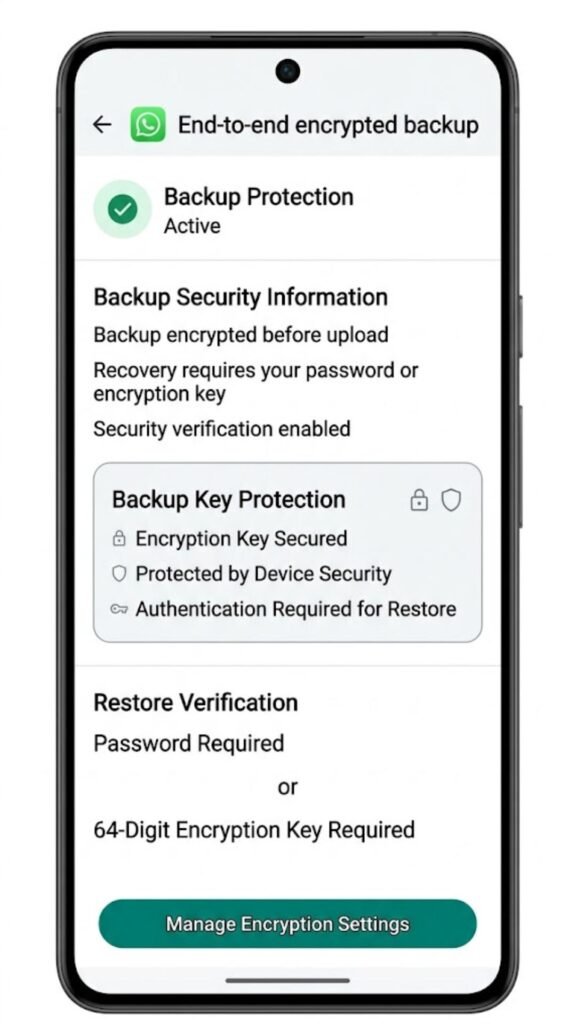
WhatsApp backup encryption also protects local backup files on your device when end-to-end encrypted backup is enabled. The local .crypt15 file on your phone is also encrypted with the same key, providing consistent protection across both storage locations.
What WhatsApp Backup Encryption Does Not Protect
WhatsApp backup encryption does not protect messages during transit — those are covered by the separate Signal Protocol end-to-end encryption that has always been part of WhatsApp. WhatsApp backup encryption specifically addresses stored backup files.

It does not protect your conversation data on the recipient’s device. If someone you message does not have encrypted backup enabled, your shared conversation history in their backup is subject to their backup settings, not yours.
WhatsApp backup encryption does not prevent someone with physical access to your unlocked phone from reading your messages within the app — that requires separate device security measures like screen lock and app lock.
WhatsApp Backup Encryption: Encrypted vs Unencrypted Backup Comparison
| Feature | Encrypted Backup | Standard Backup |
|---|---|---|
| Google Drive Storage | ✅ Encrypted — unreadable without key | ⚠️ Google’s standard encryption |
| Meta Can Access Backup | ❌ No | ⚠️ Potentially |
| Google Can Access Backup | ❌ No | ⚠️ Under certain conditions |
| Password Required to Restore | ✅ Yes | ❌ No |
| Key Loss Risk | ⚠️ High — no recovery without key | ❌ None |
| Restore Without Correct Account | ❌ No | ❌ No |
| Protection Against Legal Orders | ✅ Stronger | ⚠️ Limited |
| Local Backup Encrypted | ✅ Yes | ✅ Yes (.crypt15 format) |
| Setup Required | ✅ Manual activation | ❌ Automatic |
| Default Setting | ❌ Not enabled by default | ✅ Default |
What Happens If You Lose Your WhatsApp Backup Encryption Key
This is the most serious consequence of WhatsApp backup encryption and the one that requires the clearest explanation. If you lose your password and cannot remember it — or if you lose your 64-digit key and have no stored copy — your backup becomes permanently inaccessible.
WhatsApp does not store your password. Meta does not hold your key. There is no account recovery process, no support ticket resolution, and no technical workaround that retrieves the encrypted backup without the correct authentication. This is the security guarantee working exactly as designed — but it means the responsibility for key storage falls entirely on you.

Protecting Against Key Loss
Store your password or 64-digit key in a location completely separate from your phone. A password manager is a reliable option for the password method — use one that is accessible from multiple devices and backed up independently. For the 64-digit key, consider a combination of a password manager entry and a physical written copy stored securely.
If you forget your password but still have access to your WhatsApp account on your current device, you can change the encryption password through the same settings menu — Chat Backup, then End-to-End Encrypted Backup — as long as you are making the change on a device where WhatsApp is still logged in and active.

WhatsApp Backup Encryption and Switching Phones
When switching to a new Android phone with WhatsApp backup encryption enabled, the restore process requires your encryption password or 64-digit key in addition to your phone number verification. Without it, the encrypted backup cannot be decrypted and restoration fails entirely — the restore option may appear but will not complete without the correct key.
This is a scenario many users encounter when they enable WhatsApp backup encryption, switch phones some time later, and find they cannot complete the restore because the password was not stored safely. The practical lesson is to verify your encryption credentials are stored safely immediately after enabling the feature — before you need them.

Frequently Asked Questions
What is WhatsApp backup encryption?
WhatsApp backup encryption is an optional end-to-end encryption feature that protects your WhatsApp backup stored on Google Drive with a password or 64-digit key that only you possess — making it unreadable to Google, Meta, or anyone else without that key.
Is WhatsApp backup encryption enabled by default?
No. WhatsApp backup encryption must be manually enabled through Settings, then Chats, then Chat Backup, then End-to-End Encrypted Backup. Standard backups without this feature are stored with Google’s default encryption.
What happens if I forget my WhatsApp backup encryption password?
If you forget your password and have no recovery key, the encrypted backup becomes permanently inaccessible. WhatsApp does not store your password and cannot recover it. Store your password or 64-digit key securely before you need it.
Can I restore WhatsApp without the encryption key?
No. An encrypted backup requires the correct password or 64-digit key to decrypt and restore. Without it, the backup file exists on Google Drive but cannot be used. Phone number verification alone is not sufficient for encrypted backups.
Does WhatsApp backup encryption protect my messages in transit?
No. Messages in transit are protected by the Signal Protocol end-to-end encryption that WhatsApp has always used. WhatsApp backup encryption specifically protects the backup file stored on Google Drive — these are two separate protection layers.
Can I turn off WhatsApp backup encryption after enabling it?
Yes. Go to Settings, Chats, Chat Backup, End-to-End Encrypted Backup, and select Turn Off. Future backups revert to standard unencrypted format. Existing encrypted backups remain encrypted until overwritten by a new backup.
Conclusion
WhatsApp backup encryption fills a meaningful gap in the platform’s privacy architecture. Messages during transmission have always been protected by end-to-end encryption. The backup stored on Google Drive has historically not had the same protection — and WhatsApp backup encryption changes that for users who choose to enable it.
The trade-off is clear and worth accepting eyes open: stronger protection of your stored backup data in exchange for full personal responsibility over your encryption key. There is no middle ground here. The security guarantee only works because WhatsApp does not hold the key — which means no one can retrieve it for you if it is lost.
Enable WhatsApp backup encryption if privacy of your stored backup matters to you. Store the password or 64-digit key in a password manager immediately after setup. Verify those credentials are accessible before switching phones or performing a factory reset. That sequence — enable, store, verify — is all it takes to ensure WhatsApp backup encryption works as protection rather than becoming a barrier to your own data.
