
The best tablets under $700 occupy a genuinely exciting bracket in the tablet market — wide enough to include everything from capable budget Android picks to near-flagship hardware with premium displays, flagship processors, and long software update commitments that justify multi-year ownership. Spending up to $700 on a tablet is a deliberate decision, and buyers in this range rightfully expect more than basic competence. They expect hardware and software experiences that hold up under serious daily demands without cutting corners on the components that matter most.
Navigating the best tablets under $700 landscape requires understanding what genuinely separates compelling value from marketing noise. A 15.6-inch Android tablet with an impressive spec sheet might look like an obvious choice on paper, while a compact gaming tablet with a Snapdragon 8 Gen 3 processor might seem niche — until you understand that the latter delivers a processing experience that rivals devices costing twice as much. The best tablets under $700 guide exists to cut through that noise with honest, practical editorial analysis.
This guide covers twelve of the best tablets under $700 across two clear tiers — devices under $350 that deliver exceptional value for the price, and premium picks approaching the full $700 ceiling that target specific buyers with precise needs. Every device is evaluated on display quality, processing performance, battery longevity, software support, and practical ownership considerations. Whether you need a student productivity companion, a premium entertainment screen, a Windows 2-in-1 for desktop workflows, or a dedicated gaming tablet, the best tablets under $700 category has a genuinely strong answer for every use case.

Best Tablets Under $700 — At a Glance
A quick reference to every best tablets under $700 pick in this guide:
Best Tablets Under $350
- Lenovo Tab One — Best compact budget tablet for portable family entertainment
- Microsoft Surface Go 3 (Renewed) — Best renewed Windows tablet for light productivity
- Lenovo Tab M11 — Best mid-range Android tablet for everyday productivity and display quality
- Samsung Galaxy Tab S10 Lite — Best all-around Android tablet under $350 with S Pen
- Xiaomi Redmi Pad 2 — Best mid-range tablet for 2.5K display and long battery life
- onn 11-inch Core Tablet — Best value large-screen Android tablet with long battery life
Best Tablets Under $700
- Samsung Galaxy Tab S7 FE — Best large-screen Android tablet under $700 with S Pen
- Lenovo Duet 11 Chromebook — Best 2-in-1 Chromebook tablet for versatile everyday use
- Apple iPad Air 13-inch (M2) — Best premium iPad under $700 for Apple Intelligence
- Fusion5 Helios 12 Windows Tablet — Best Windows 11 tablet under $700 for creative work
- Lenovo Legion Tab Gen 3 — Best dedicated Android gaming tablet under $700
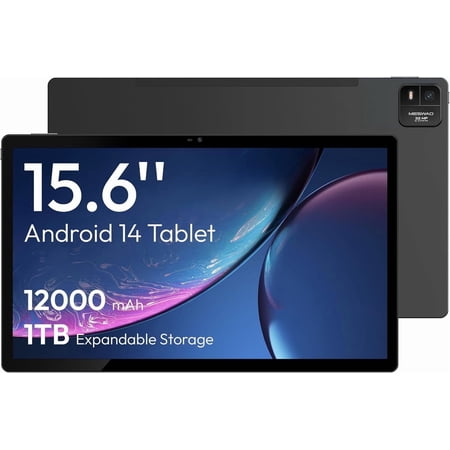
- MESWAO 15.6-inch Android Tablet — Best large-screen Android tablet for media consumption

Best Tablets Under $350
1. Lenovo Tab One
Best For: Compact portable entertainment and family use

Product Highlights:
- 8.7-inch HD display with 480 nits brightness and 1340×800 resolution
- MediaTek Helio G85 processor with smooth 60Hz refresh rate
- Up to 12.5 hours of YouTube streaming on a single charge
- 15W faster charging than previous Lenovo budget generation
- Dual Dolby Atmos speakers for immersive stereo audio
- Weighs under one pound for maximum everyday portability
- Folio case with built-in stand included in the box
- Google Kids Space for age-appropriate family content
The Lenovo Tab One is one of the most dependable picks in the best tablets under $700 entry tier for buyers who want a lightweight, reliable device that handles daily entertainment without demanding complexity. The Helio G85 manages streaming, casual browsing, and light gaming competently, and the dual Dolby Atmos speakers deliver noticeably richer audio than most competing budget tablets at this price.
The included folio case — which doubles as a hands-free stand — alongside the exceptional battery stamina make the Tab One a practical, travel-friendly choice for families and commuters evaluating the best tablets under $700 on a careful budget. Google Kids Space adds age-appropriate content safety that makes it an easy recommendation for parents shopping the best tablets under $700 with younger users in mind.
Reasons to Buy:
- Exceptional 12.5-hour battery stamina for a compact budget tablet
- Folio case included with built-in stand for hands-free viewing
- Dual Dolby Atmos speakers outperform most budget tablet competitors
- Under one pound — among the most portable picks in the best tablets under $700 guide
- Google Kids Space adds child-safe family content functionality
Reasons to Avoid:
- 4GB RAM creates noticeable limitations during heavy multitasking
- 60Hz display feels less fluid than 90Hz alternatives in this price range
- 64GB base storage requires immediate SD card expansion for media users
- HD resolution is adequate but trails sharper IPS panels at higher price points
2. Microsoft Surface Go 3 (Renewed)
Best For: Light Windows productivity in a compact renewed package

Product Highlights:
- 10.5-inch PixelSense touchscreen at 1920×1280 resolution
- Intel Core i3-10100Y processor for confident Windows multitasking
- 8GB RAM for comfortable multi-app Windows workflows
- 128GB SSD storage for fast, responsive app loading and file access
- Adjustable kickstand built directly into the chassis
- Full Windows 11 for complete desktop app compatibility
- Lightweight starting at 1.2 pounds
The renewed Microsoft Surface Go 3 Core i3 version is a meaningful upgrade over the Pentium configuration in the best tablets under $700 context — the Core i3-10100Y processor handles Windows multitasking noticeably more confidently, making it a credible productivity device rather than a basic browsing machine. The 1920×1280 PixelSense display is among the sharpest in the under-$350 tier, and the 8GB RAM configuration ensures Windows applications run without the memory pressure that plagues 4GB Windows tablets.
Full Windows 11 compatibility means complete access to desktop software ecosystems that Android alternatives in the best tablets under $700 guide simply cannot replicate. Buyers considering this renewed Surface Go 3 should verify renewal certification standards, confirm battery health, and ensure at minimum a 90-day warranty before committing.
Reasons to Buy:
- Core i3 delivers meaningfully stronger Windows performance than Pentium alternatives
- 1920×1280 PixelSense display is among the sharpest in the under-$350 tier
- Full Windows 11 enables desktop software ecosystem compatibility
- 128GB SSD provides fast, snappy storage performance
- Adjustable kickstand supports flexible desktop-style use without accessories
Reasons to Avoid:
- Renewed condition requires thorough seller and battery health verification
- Type Cover keyboard sold separately — adds significant cost for full productivity
- Battery life trails Android alternatives significantly for sustained mobile use
- Windows touch navigation on 10.5 inches requires initial adaptation
3. Lenovo Tab M11
Best For: Everyday productivity and vivid media consumption

Product Highlights:
- 11-inch WUXGA display at 1920×1200 resolution for sharp, detailed viewing
- MediaTek Helio G88 octa-core processor for reliable everyday performance
- 4GB RAM with 128GB SSD storage for quick app access
- Up to 10 hours of battery life for full-day use
- Ambient light sensor for automatic brightness adaptation
- USB-C port and 3.5mm audio jack for versatile connectivity
- Folio case included in the box
- Available in 256GB SSD configuration for expanded storage needs
The Lenovo Tab M11 occupies a practical middle ground in the best tablets under $700 entry tier — delivering a sharper display and more storage than the Tab One while remaining well below the $350 ceiling. The 11-inch WUXGA panel at 1920×1200 resolution produces noticeably more detailed imagery for reading, browsing, and media consumption than competing HD panels, and the Helio G88 handles everyday productivity apps and streaming without hesitation.
The 128GB SSD storage provides fast access speeds compared to slower eMMC configurations in competing budget tablets, and the ambient light sensor adds a comfort feature that budget tablets typically omit. For buyers in the best tablets under $700 category who need a reliable mid-range Android device for both productivity and entertainment, the Lenovo Tab M11 delivers a well-balanced, trustworthy daily experience.
Reasons to Buy:
- 1920×1200 WUXGA display is significantly sharper than competing budget HD panels
- 128GB SSD storage provides faster access speeds than eMMC alternatives
- Folio case included adds immediate protective and functional value
- Helio G88 handles everyday productivity and streaming reliably
- Ambient light sensor adjusts brightness automatically for comfortable viewing
Reasons to Avoid:
- 4GB RAM creates limitations under demanding multitasking workloads
- 60Hz refresh rate trails 90Hz alternatives available at similar price points
- Helio G88 underperforms in GPU-intensive gaming scenarios
- Software update commitment from Lenovo is shorter than Samsung or Apple equivalents
4. Samsung Galaxy Tab S10 Lite
Best For: All-around Android productivity and daily use

Product Highlights:
- 10.9-inch LCD display with 90Hz adaptive refresh at 2112×1320 resolution
- Exynos 1380 chipset with 6GB RAM for smooth, confident daily performance
- S Pen included for handwriting, annotation, and precision drawing
- Android 15 with Vision Booster adaptive brightness technology
- Up to 16 hours of battery life with Super Fast Charging
- Circle to Search with Google for instant on-screen results
- AI tools: Note Assist, Math Solver, and Handwriting Assist
- Storage expandable to 2TB via microSD
- Available in multiple colors including Gray, Blue, Coral Red, and Silver
The Samsung Galaxy Tab S10 Lite is the most complete package among the best tablets under $700 in the entry tier — combining a fluid 90Hz display, an included S Pen, Samsung’s AI productivity tools, and a documented software update commitment in a device that remains well below the $350 threshold. The 90Hz display makes everyday scrolling and navigation noticeably more fluid than the 60Hz panels across most competing alternatives at this price, and the S Pen transforms the tablet into a capable note-taking and creative device without any additional purchase required.
Samsung’s AI tools — Note Assist, Math Solver, and Handwriting Assist — add genuine academic and professional utility that students and knowledge workers engage with regularly. The 16-hour battery life is exceptional for a tablet of this size, and Super Fast Charging minimizes downtime when the battery does need replenishment. Among all entry-tier picks in the best tablets under $700 guide, the Galaxy Tab S10 Lite offers the strongest combination of hardware quality and long-term ownership confidence.
Reasons to Buy:
- S Pen included adds genuine note-taking and drawing capability at no extra cost
- 90Hz display provides noticeably smoother scrolling than 60Hz alternatives
- 16-hour battery life leads the entry tier for endurance
- Samsung AI tools deliver practical academic and productivity utility
- Strong Samsung software update commitment supports multi-year ownership
Reasons to Avoid:
- Exynos 1380 trails Snapdragon equivalents in GPU-intensive gaming workloads
- USB Type-C 2.0 limits data transfer speeds compared to USB 3.x standards
- Keyboard cover and productivity accessories sold separately at additional cost
- LCD panel lacks the contrast depth of AMOLED alternatives in the premium tier
5. Xiaomi Redmi Pad 2
Best For: 2.5K display quality and long battery life under $350

Product Highlights:
- 11-inch 2.5K display at 2560×1600 resolution with 90Hz refresh rate
- MediaTek Helio G100 Ultra on 6nm manufacturing process
- 500 nits typical brightness with 600 nits outdoor mode
- TÜV Rheinland Low Blue Light, Flicker Free, and Circadian Friendly certified
- 9000mAh battery for exceptional multi-session stamina
- Quad speakers with Dolby Atmos and Hi-Res Audio support
- Bluetooth 5.3 and WiFi 5 connectivity
- 8MP rear camera and 5MP front camera
- Android 15 with HyperOS integration
- MicroSD card slot for expandable storage
- Available in Graphite Gray, Mint Green, and Lavender Purple
The Xiaomi Redmi Pad 2 is the best display-per-dollar proposition in the entire best tablets under $700 entry tier. The 11-inch 2.5K panel at 2560×1600 and 274 PPI delivers sharpness and clarity that competing tablets at this price struggle to match, and the TÜV Rheinland triple certification for Low Blue Light, Flicker Free, and Circadian Friendly standards ensures comfortable viewing during extended use.
The Helio G100 Ultra is a genuinely capable chip for this price bracket, handling streaming, multitasking, and casual gaming without frustration. The 9000mAh battery is the largest in the entry tier section of the best tablets under $700 guide, providing multi-day stamina for moderate users and marathon single-day use for heavy users. Quad Dolby Atmos speakers round out an entertainment experience that rivals tablets at significantly higher price points.
Reasons to Buy:
- 2.5K display at 274 PPI is the sharpest panel in the best tablets under $700 entry tier
- 9000mAh battery delivers exceptional multi-session stamina
- TÜV Rheinland triple certification confirms display safety for extended use
- Quad Dolby Atmos speakers deliver premium audio for the price tier
- Helio G100 Ultra on 6nm handles everyday demands efficiently
Reasons to Avoid:
- WiFi 5 only — lacks the WiFi 6 connectivity of competing mid-range tablets
- HyperOS may feel unfamiliar to users accustomed to stock Android
- No cellular connectivity — WiFi only configuration
- Xiaomi global after-sales support network varies significantly by region
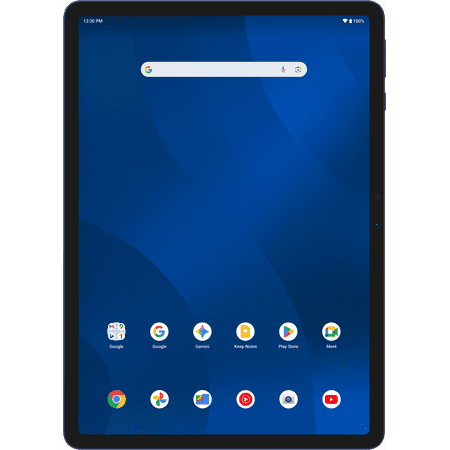
6. onn 11-inch Core Tablet
Best For: Value large-screen Android experience with long battery life

Product Highlights:
- 11-inch display with 1840×1280 resolution for clear, detailed viewing
- Android 16 operating system — among the most current in this price tier
- 2.2GHz octa-core processor with 6GB RAM
- 128GB internal storage
- Up to 17 hours of battery life — exceptional for the price
- All-screen design for a more immersive viewing experience
- Available in Navy, Mocha, Pink, and Silver
- USB-C charging cable included
The onn 11-inch Core Tablet earns its position in the best tablets under $700 entry tier through a combination of Android 16, a 17-hour battery life claim, and 6GB RAM at a price point that significantly undercuts most competing mid-range Android tablets. The 1840×1280 resolution delivers a balanced aspect ratio that suits both landscape media consumption and portrait document reading, and the all-screen design maximizes the usable display area within the chassis footprint.
Android 16 keeps the software experience current, and the 6GB RAM configuration handles everyday multitasking more smoothly than the 4GB alternatives found in many competing budget tablets. The 17-hour battery claim — if achievable under mixed real-world use — positions this as one of the most enduring picks in the best tablets under $700 guide at any price tier. Buyers researching the best tablets under $700 on a strict budget will find the onn Core Tablet a compelling, unpretentious option.
Reasons to Buy:
- 17-hour battery life claim leads the entry tier section if achieved under real conditions
- Android 16 is among the most current OS versions available at this price point
- 6GB RAM handles everyday multitasking more smoothly than 4GB alternatives
- All-screen design maximizes display area within a compact form factor
- Competitive price makes it the most accessible large-screen pick in this tier
Reasons to Avoid:
- onn brand lacks established software update and long-term support track record
- Octa-core chipset identity not clearly specified — limits transparent benchmarking
- 1840×1280 resolution is adequate but not competitive with 2.5K alternatives
- No stylus or keyboard accessory ecosystem for productivity-focused buyers
Best Tablets Under $700
1. Samsung Galaxy Tab S7 FE
Best For: Large-screen Android productivity with S Pen under $700

Product Highlights:
- 12.4-inch TFT display at 2560×1600 resolution for expansive content viewing
- Qualcomm Snapdragon SM7225 octa-core processor
- S Pen included — responsive, natural writing and drawing experience
- Long-lasting battery designed for all-day use
- Multi-window DeX-style productivity for PC-like workflows
- 256GB storage configuration for large media libraries
- Available in Mystic Black, Mystic Green, Mystic Silver, and Mystic Pink
- Two months of YouTube Premium included
- WiFi and LTE configurations available
The Samsung Galaxy Tab S7 FE is one of the most compelling picks in the best tablets under $700 premium section for buyers who need a large-screen Android tablet with S Pen capability at a price point well below the Galaxy Tab S series flagships. The 12.4-inch TFT display provides an expansive canvas for note-taking, creative work, split-screen multitasking, and media consumption, and the included S Pen delivers the kind of natural, responsive handwriting experience that makes digital note-taking genuinely prefer over paper for many students.
The Snapdragon SM7225 handles everyday productivity, streaming, and casual gaming reliably, and Samsung’s DeX-style multi-window mode creates a near-PC workflow when paired with a keyboard and mouse. CNET’s recognition of the Galaxy Tab S7 FE as its Best Android Tablet pick reflects the genuine quality this device delivers within the best tablets under $700 category.
Reasons to Buy:
- 12.4-inch display provides expansive canvas for productivity and media consumption
- S Pen delivers natural handwriting and creative drawing experience
- DeX-style multi-window enables near-PC productivity workflows
- 256GB storage handles large app and media libraries without constraint
- Available in LTE configurations for buyers needing mobile cellular connectivity
Reasons to Avoid:
- TFT display panel lacks the color accuracy and contrast of AMOLED alternatives
- 60Hz refresh rate trails 90Hz and 144Hz competitors in the premium tier
- Samsung’s OS update support for this generation is approaching its practical end
- Keyboard cover accessories sold separately at significant additional cost
2. Lenovo Duet 11 Chromebook
Best For: 2-in-1 Chromebook versatility for students and light workers

Product Highlights:
- 10.95-inch 2K LCD touchscreen at 1920×1200 WUXGA resolution
- MediaTek Kompanio 838 processor for efficient ChromeOS performance
- 4GB RAM with 128GB eMMC storage
- Keyboard included in the bundle for immediate 2-in-1 use
- ChromeOS for access to Google Workspace, Android apps, and Linux
- Luna Gray color with Lenovo’s slim, modern design language
- Multi-mode versatility: tablet, laptop, and tent configurations
The Lenovo Duet 11 Chromebook occupies a unique position in the best tablets under $700 premium section as a ChromeOS device — combining Android app compatibility, Google Workspace integration, and Linux support in a 2-in-1 form factor that arrives keyboard-equipped from the box. ChromeOS is a genuinely capable operating system for students who live in Google’s ecosystem — Google Docs, Sheets, Meet, and Classroom integrate seamlessly, and the Android app layer extends app availability beyond web applications.
The MediaTek Kompanio 838 handles ChromeOS workloads efficiently, and the 2K display provides a sharp canvas for document editing and web browsing. The included keyboard makes the Duet 11 immediately useful as a lightweight laptop replacement for buyers in the best tablets under $700 category who don’t need the full Windows desktop application ecosystem but want more than a pure Android tablet experience.
Reasons to Buy:
- ChromeOS provides Google Workspace, Android apps, and Linux compatibility
- Keyboard included — immediate 2-in-1 value without additional accessory cost
- 2K WUXGA display is sharp enough for comfortable extended document editing
- ChromeOS receives long-term Google update support — typically eight years
- Lightweight and portable for student daily carry
Reasons to Avoid:
- 4GB RAM is limiting for ChromeOS with multiple browser tabs and Android apps simultaneously
- eMMC storage is slower than SSD alternatives in competing devices at this price
- ChromeOS is unsuitable for buyers requiring full Windows desktop app compatibility
- Limited offline functionality compared to Android and Windows alternatives
3. Apple iPad Air 13-inch (M2)
Best For: Premium large-screen iPadOS productivity and Apple Intelligence

Product Highlights:
- 13-inch Liquid Retina display at 2732×2048 resolution with P3 wide color, True Tone, and ultralow reflectivity
- Apple M2 chip with Neural Engine for demanding creative and AI workloads
- Built for Apple Intelligence — on-device AI for writing, creativity, and productivity
- 12MP landscape Ultra Wide front camera with Center Stage for video calls
- 12MP rear camera for photos and 4K video recording
- WiFi 6E for the fastest wireless connectivity in this guide’s premium tier
- Touch ID for secure, convenient biometric authentication
- All-day battery life for sustained daily use
- USB-C with USB 3 speeds for fast data transfer
- Compatible with Apple Pencil Pro and Magic Keyboard with trackpad
The Apple iPad Air 13-inch M2 is the most premium and capable device in the entire best tablets under $700 guide, and it justifies its position through hardware and software quality that no other tablet in this guide can match comprehensively. The M2 chip is a genuine laptop-class processor — handling intensive photo editing, video production, music creation, and demanding professional applications with the kind of sustained performance that mobile ARM chipsets achieve only at their very peak.
The 13-inch Liquid Retina display is the most color-accurate and visually refined panel in the best tablets under $700 guide, combining P3 wide color, True Tone, and ultralow reflectivity in a way that makes it the preferred choice for color-sensitive creative work. Apple Intelligence integration — including Writing Tools, Image Playground, and Genmoji — represents the most mature on-device AI implementation available in any tablet at this price point. For buyers searching the best tablets under $700 who want the definitive iPadOS creative and productivity experience, the iPad Air 13-inch M2 is the answer.
Reasons to Buy:
- M2 chip delivers laptop-class sustained performance for demanding creative workflows
- 13-inch Liquid Retina display is the most refined panel in the best tablets under $700 guide
- Apple Intelligence provides the most mature on-device AI integration available
- WiFi 6E delivers the fastest wireless connectivity in this guide’s premium section
- Five-plus years of iPadOS updates guarantee exceptional long-term ownership value
Reasons to Avoid:
- Apple Pencil Pro and Magic Keyboard sold separately at significant additional cost
- iPadOS ecosystem creates progressive lock-in for buyers with mixed-platform needs
- 128GB base storage feels limited for users with large creative media libraries
- macOS desktop app compatibility requires workarounds not needed on Windows devices
4. Fusion5 Helios 12 Windows Tablet
Best For: Full Windows 11 creative productivity in a large-screen tablet

Product Highlights:
- 12-inch 2K display at 2000×1200 with 16:10 aspect ratio
- Intel N100 quad-core 13th Gen processor turbo to 3.4GHz
- 12GB DDR5 RAM for fast, next-generation memory performance
- 512GB SSD for ample fast storage and quick boot times
- Active cooling fan prevents thermal throttling under sustained workloads
- Windows 11 Home with full desktop application compatibility
- Fusion5 stylus pen included for annotation and creative input
- 36W USB-C fast charging included in the box
- Dual USB-C ports, USB 3.0, Micro HDMI, and 3.5mm headphone jack
- Assembled in Florida, USA with two-year warranty
The Fusion5 Helios 12 steps up meaningfully from the 10.1-inch Fusion5 entry model in the best tablets under $700 guide through a larger 12-inch 2K display, DDR5 RAM, 512GB SSD storage, and the addition of an active cooling fan that prevents the thermal throttling that causes sustained performance degradation in passively cooled Windows tablets. For buyers in the best tablets under $700 premium section who need full Windows 11 desktop app compatibility in a genuinely large-screen form factor, the Helios 12 delivers the most complete Windows tablet package available.
The included stylus adds creative and annotation capability without additional purchase, and the comprehensive connectivity — dual USB-C, USB 3.0, and Micro HDMI — enables docking setups that most competing tablets cannot match. The two-year warranty with accidental damage coverage remains the strongest buyer protection commitment in the best tablets under $700 guide.
Reasons to Buy:
- Full Windows 11 with Intel 13th Gen enables complete desktop software ecosystem
- Active cooling fan prevents throttling under sustained demanding workloads
- 512GB SSD and 12GB DDR5 RAM provide fast, confident multitasking headroom
- Stylus included for annotation and creative input without additional cost
- Micro HDMI enables external display connection for expanded productivity
- Two-year warranty with accidental damage coverage is exceptional buyer protection
Reasons to Avoid:
- Intel N100 is efficient but not suited for GPU-intensive creative or gaming workloads
- 4500mAh battery provides limited unplugged endurance compared to Android alternatives
- Docking keyboard sold separately for full laptop-mode productivity
- Windows touch optimization on a 12-inch display requires user adaptation
5. Lenovo Legion Tab Gen 3
Best For: Dedicated Android gaming performance under $700

Product Highlights:
- 8.8-inch 2.5K display at 2560×1600 with 165Hz refresh rate and 500 nits
- Qualcomm Snapdragon 8 Gen 3 — one of the fastest mobile processors available
- 12GB LPDDR5X RAM for demanding gaming and creative multitasking
- 256GB UFS 4.0 storage for ultra-fast game loading and data access
- LTPS display panel for efficient high-refresh performance
- Gaming-optimized Android build with performance mode features
- Premium build quality reflecting Legion gaming heritage
The Lenovo Legion Tab Gen 3 is the most specialized pick in the entire best tablets under $700 guide — and for its target audience, it’s the most compelling. The Snapdragon 8 Gen 3 processor is the same flagship chip found in premium smartphones that cost significantly more than this tablet, and the 165Hz refresh rate display creates the smoothest, most responsive visual experience available in any tablet in the best tablets under $700 category.
UFS 4.0 storage delivers data access speeds that outperform every other storage configuration in this guide, resulting in faster game load times and app launches that make a perceptible daily difference. The 12GB LPDDR5X RAM ensures games, background apps, and system processes coexist without memory pressure. For buyers in the best tablets under $700 category who specifically want a gaming-first tablet that delivers flagship processing capability in a compact, handheld-friendly 8.8-inch form factor, the Lenovo Legion Tab Gen 3 is unambiguously the pick.
Reasons to Buy:
- Snapdragon 8 Gen 3 is among the most powerful mobile processors in any tablet at this price
- 165Hz display is the highest refresh rate in the entire best tablets under $700 guide
- UFS 4.0 storage delivers the fastest data access speeds in this guide
- 12GB LPDDR5X RAM handles the most demanding gaming workloads confidently
- Compact 8.8-inch form factor suits handheld gaming more naturally than larger alternatives
Reasons to Avoid:
- 8.8-inch display is smaller than most tablets in the best tablets under $700 guide
- Gaming optimization comes at the expense of general productivity versatility
- Snapdragon 8 Gen 3 generates heat under sustained peak gaming workloads
- No stylus or keyboard accessory ecosystem for productivity-focused buyers
6. MESWAO 15.6-inch Android Tablet
Best For: Large-screen media consumption and home entertainment use

Product Highlights:
- 15.6-inch FHD IPS display at 1920×1080 for expansive viewing
- MediaTek Helio G99 octa-core on 6nm manufacturing process
- 8GB RAM with 256GB storage expandable to 1TB
- 12000mAh battery for exceptional multi-day endurance
- 32MP rear camera with flash and 5MP front camera
- Quad speakers for immersive audio across the large chassis
- Dual WiFi band connectivity
- Android 14 operating system
The MESWAO 15.6-inch tablet is the most distinctive pick in the best tablets under $700 premium section because it operates in a category almost entirely its own — 15.6-inch Android tablets are rare, and for buyers who genuinely want the largest possible screen for home entertainment, media consumption, or shared family viewing, there is no competing alternative at this price point. The Helio G99 on a 6nm process is a capable mid-tier chipset that handles 1080p streaming, browsing, and everyday multitasking without meaningful frustration, and the 12000mAh battery is the largest in the entire best tablets under $700 guide — providing exceptional multi-day stamina for moderate users.
The quad speaker array distributes audio effectively across the wide chassis. However, buyers should approach the MESWAO with clear expectations: at 15.6 inches, this is a fixed-position home device rather than a portable carry tablet, and the limited review history warrants careful purchase consideration before committing.
Reasons to Buy:
- 15.6-inch display is the largest screen in the entire best tablets under $700 guide
- 12000mAh battery delivers the longest endurance of any pick in this guide
- Helio G99 on 6nm handles everyday media and browsing tasks efficiently
- 32MP rear camera is the highest megapixel rear camera in this guide
- Quad speakers distribute audio effectively for the large form factor
Reasons to Avoid:
- 15.6-inch size makes it a fixed home device rather than a portable carry tablet
- MESWAO brand has very limited review history and uncertain long-term support
- 1920×1080 resolution on a 15.6-inch panel produces lower pixel density
- Android 14 on an unfamiliar skin may receive limited future update support
- Very limited user ratings make quality consistency difficult to verify
What to Look for in the Best Tablets Under $700
Display Quality, Resolution, and Refresh Rate
Display quality is the most impactful hardware factor in daily tablet satisfaction. Among the best tablets under $700, panels range from basic 1340×800 HD budget screens to the 13-inch Liquid Retina display with P3 wide color in the Apple iPad Air M2. Refresh rate significantly affects perceived smoothness — 90Hz and 165Hz panels feel markedly more fluid than 60Hz alternatives. For media consumption, prioritize resolution and panel technology. For gaming and interactive use, prioritize refresh rate. For creative work, prioritize color accuracy and display certification standards.
Processor Choice and Long-Term Performance
The chipset choice defines how gracefully a tablet handles demanding workloads over its entire ownership lifespan. Budget picks in the best tablets under $700 guide rely on Helio G85, G88, and G99 chipsets — capable for everyday tasks but limited under intensive gaming or creative demands. Mid-range options like the Exynos 1380 and Snapdragon SM7225 handle most daily scenarios confidently. Premium picks with Snapdragon 8 Gen 3, Apple M2, and Intel N100 deliver flagship or near-flagship processing power that sustains performance under the most demanding workloads buyers in the best tablets under $700 category might encounter.
Battery Capacity and Charging Speed
Battery configurations in the best tablets under $700 guide range from the Fusion5’s 4500mAh to the MESWAO’s 12000mAh. Larger batteries sustain longer use but add weight. Fast charging meaningfully reduces daily downtime — the Samsung Galaxy Tab S10 Lite Super Fast Charging, Lenovo Tab M11’s USB-C fast charging, and Fusion5’s 36W PD charging all provide recovery speeds that standard slow chargers cannot match. Consider daily usage intensity and access to charging before prioritizing battery size.
Software Support and Ecosystem Value
Software update policies define long-term ownership value in a way that initial hardware quality cannot compensate for. Apple provides five or more years of iPadOS updates. Samsung commits to four years of Android OS updates. Google’s ChromeOS on the Lenovo Duet typically supports eight years. Lenovo’s update commitment is shorter. Budget brands like MESWAO and onn provide less clearly documented timelines. If you plan to use your best tablets under $700 choice for four or more years, the update policy should carry significant weight in your final decision.
Windows vs Android vs iPadOS vs ChromeOS
The operating system is the most fundamental decision when choosing among the best tablets under $700. Android dominates the tablet category in variety and app availability. iPadOS delivers the best app optimization and longest software support. Windows enables full desktop application compatibility at the cost of battery life and touch optimization. ChromeOS provides Google ecosystem integration and Linux support with excellent long-term update guarantees. Each serves a different buyer profile — matching the OS to your actual daily workflow is more important than any single hardware specification.
Long-Term Ownership Considerations
Choosing from the best tablets under $700 is a multi-year investment that deserves honest consideration of practical ownership realities:
Battery Degradation: Lithium-ion batteries degrade gradually with charge cycles. After two to three years of daily use, expect noticeable capacity reduction across every device in this guide. The MESWAO 12000mAh and Xiaomi Redmi Pad 2’s 9000mAh cells provide the most natural buffer before degradation meaningfully impacts daily usability.
Software Longevity: The single most consistently underweighted factor in tablet buying. The Apple iPad Air M2’s five-plus years of iPadOS updates and Samsung’s four-year Android commitment deliver the strongest long-term value among the best tablets under $700. ChromeOS on the Lenovo Duet typically provides eight years of updates — the longest commitment in any OS category. Budget brand Android tablets often receive shorter, less predictable update timelines.
Repairability and Service Access: Most tablets in the best tablets under $700 guide are difficult to service independently. Screen replacements, battery swaps, and charging port repairs typically require professional service. The Fusion5’s two-year accidental damage warranty provides the most comprehensive buyer protection against unplanned repair costs. Verify service availability in your region before purchase, particularly for international tablet brands.
Ecosystem Lock-In: Apple’s iPadOS is the most cohesive ecosystem but creates the deepest lock-in — accessories, iCloud services, and workflows become progressively Apple-dependent. Samsung’s ecosystem integrates naturally with Galaxy smartphones. ChromeOS ties buyers to Google’s services ecosystem. Android budget tablets offer the most flexibility but least cohesion. Windows devices provide the broadest software compatibility but require adaptation to optimize for touch use.
Renewed Hardware Verification: The Microsoft Surface Go 3 in this guide is a renewed device. Always verify the renewal certification level, confirm battery health status, check remaining software update support, and ensure at minimum a 90-day warranty from the seller before committing to any renewed device in the best tablets under $700 category. Not all renewed sellers apply consistent refurbishment standards.
Conclusion
The best tablets under $700 category covers a genuinely impressive spectrum of hardware quality, software ecosystems, and use-case specificity — from ultra-affordable entry picks that handle daily basics to the Apple iPad Air M2, which delivers laptop-class performance in a tablet form that rivals far more expensive hardware. Choosing the right device from the best tablets under $700 guide is ultimately a question of honest self-assessment: what do you actually need this tablet to do, how long do you intend to own it, and which operating system aligns with your existing workflow and device ecosystem?
Match your choice to real-world usage patterns — prioritize display quality for media and creative work, processing power for gaming and intensive productivity, battery capacity for mobile heavy users, and software update longevity for anyone planning three to five years of ownership. With those priorities clearly defined, the best tablets under $700 available today offer exceptional value that would have demanded flagship-tier pricing just a generation ago, and any of the twelve picks in this guide will reward buyers who choose based on genuine needs rather than spec sheet appeal alone.