



The best tablets under $400 sit in a genuinely interesting sweet spot. You’re no longer compromising on the fundamentals — display quality, processor capability, software longevity, and build quality all improve meaningfully at this price tier compared to budget options. But you’re also not paying flagship premiums for features most buyers don’t need. The best tablets under $400 include Samsung Fan Edition lineup, Lenovo’s premium student tablets, Xiaomi high-refresh display slates, Windows 2-in-1s, and even renewed Apple hardware — giving buyers more genuine choice than any other price bracket.
The challenge is knowing which of the best tablets under $400 actually delivers on its promises. Marketing specs are easy to inflate. Real-world value — the kind that holds up six months into ownership — requires a more honest evaluation. We compared display accuracy, processor performance, software update commitments, ecosystem value, and use-case fit to build a guide that actually helps you spend wisely.
Every product here earns its place in the best tablets under $400 conversation for a specific reason.

At a Glance: Best Tablets Under $400 Summary
- Best Overall Under $400: Samsung Galaxy Tab S10 FE
- Best Student Tablet Under $400: Lenovo Idea Tab Pro 12.7″
- Best Display Under $400: Xiaomi Pad 7
- Best Windows 2-in-1 Under $400: Microsoft Surface Go 3
- Best Large Screen Under $400: MESWAO 15.6″ Android 14 Tablet
- Best for Seniors Under $400: GrandPad Senior Tablet
- Best Smart Home Tablet Under $400: Lenovo Smart Tab P10
- Best Renewed Value Under $400: Apple iPad Pro 12.9″ (Renewed)
- Best Windows Legacy Pick Under $400: Microsoft Surface Pro 3
- Best Budget Powerhouse Under $400: 14-inch Android 14 Deca-Core Tablet
Real-world usage patterns suggest that the best tablets under $400 fall into clear categories: premium student tablets, creative tools, Windows productivity hybrids, senior-friendly devices, entertainment slates, and large-screen power users. Matching the right device to the right buyer is what separates a smart purchase from a regrettable one.

Best Tablets Under $400


1. Samsung Galaxy Tab S10 FE with S-Pen
Best For: Students and everyday users who want Samsung’s flagship S Pen experience at a more accessible price

Product Highlights:
- 10.9″ IPS LCD display, 2304 x 1440 (WUXGA+), 90Hz adaptive refresh
- Exynos 1580 (4nm) processor, Xclipse 540 GPU
- 8GB RAM + 128GB storage with dedicated microSD slot
- S Pen included with magnetic attachment
- 8000mAh battery with 25W fast charging
- Android 15 with One UI 7
- 13MP rear camera, 12MP ultrawide front camera
- WiFi 6E, Bluetooth 5.3, USB-C 2.0
The Samsung Galaxy Tab S10 FE earns its position at the top of the best tablets under $400 list because it delivers the most complete Samsung experience outside of the flagship Tab S10 series. The Exynos 1580 on a 4nm process node is a genuine step forward for Fan Edition hardware — it handles multitasking, streaming, and light gaming without hesitation. The 2304 x 1440 display with 90Hz adaptive refresh is sharp and fluid enough for daily use, note-taking, and content consumption. The included S Pen remains one of the most differentiating accessories in the best tablets under $400 space — no charging, instant attachment, and deep One UI integration that no third-party stylus can replicate. Android 15 with One UI 7 out of the box means this device enters the market with software currency, and Samsung’s update commitments add confidence for long-term ownership. The dedicated microSD slot remove a common budget compromise. For the best tablets under $400 that balance ecosystem polish, hardware quality, and all-around versatility, the Tab S10 FE is the benchmark.
Reasons to Buy:
- S Pen included with no extra cost — deep One UI integration
- Android 15 + One UI 7 delivers strong software longevity
- Exynos 1580 4nm chip is genuinely capable for daily workloads
- Dedicated microSD slot allows meaningful storage expansion
- WiFi 6E future-proofs wireless connectivity
Reasons to Avoid:
- Wi-Fi only model — no cellular option in this configuration
- USB-C 2.0 limits data transfer and display output speeds
- International model — domestic warranty not included
- Exynos chips historically trail Snapdragon in sustained GPU performance
2. Lenovo Idea Tab Pro 12.7″ with Google Gemini
Best For: Students and multimedia users who want a large, high-quality display with AI features and premium audio

Product Highlights:
- 12.7″ 3K LCD display at 2944 x 1840, 90Hz refresh rate
- MediaTek Dimensity 8300 processor
- 8GB RAM + 128GB storage
- 360Hz touch sampling rate, 90fps gaming support, PUBG certified
- Quad JBL Dolby Atmos speakers
- 45W fast charging, 11 hours video streaming battery life
- Google Gemini AI integration
- Circle to Search support
- Tab Pen Plus and Folio Case included
- Low Blue Light certified display
The Lenovo Idea Tab Pro 12.7″ makes a compelling argument as the best tablets under $400 for students who consume a lot of content, attend online lectures, and occasionally game. The 12.7-inch 3K display is one of the largest and sharpest panels available in the best tablets under $400 category, and the quad JBL Dolby Atmos speaker system turns passive content consumption into a genuinely immersive experience. The Dimensity 8300 is a powerful mid-range chip — PUBG certification and 90fps gaming support are not marketing fluff here, the hardware backs it up. Google Gemini integration adds AI-powered study assistance, and Circle to Search adds a genuinely useful search shortcut that students will reach for regularly. The included Tab Pen Plus and Folio Case remove the hidden accessory costs that inflate the effective price of competing tablets. For the best tablets under $400 that prioritize display size, audio quality, and academic productivity together, the Idea Tab Pro is the strongest package.
Reasons to Buy:
- 12.7″ 3K display is among the best panels in the best tablets under $400 category
- Quad JBL Dolby Atmos speakers deliver premium audio for a tablet
- Tab Pen Plus and Folio Case included — no accessory upcharge needed
- Dimensity 8300 handles gaming and multitasking with genuine confidence
- Google Gemini AI makes it a forward-looking student device
Reasons to Avoid:
- No microSD card slot confirmed — storage expansion limited
- Dimensity 8300 is capable but not the absolute fastest chip at this price
- 90Hz refresh rate trails Xiaomi Pad 7’s 144Hz in direct comparison
- Size and weight may feel large for casual one-handed use
3. Xiaomi Pad 7 (Global WiFi Version)
Best For: Display-obsessed buyers and media enthusiasts who prioritize screen quality and processing speed above all else

Product Highlights:
- 11.2″ 3.2K display at 3200 x 2136, 345 PPI, up to 144Hz refresh
- 360Hz touch sampling rate (240Hz with stylus)
- Snapdragon 7+ Gen 3 (4nm), Adreno GPU
- 8GB RAM + 128GB storage
- 8850mAh battery, 45W turbo charging (adapter sold separately)
- Android 14 with HyperOS
- WiFi 6E, Bluetooth 5.4, LDAC/LHDC 5.0 audio
- 68 billion colors, DCI-P3, Dolby Vision, HDR10, Pro HDR
- 13MP rear camera, 8MP front camera
- TÜV Rheinland Low Blue Light, Flicker Free, Circadian Friendly certified
- IR remote control included
Among the best tablets under $400, the Xiaomi Pad 7 has the most impressive display specification for the money. The 3.2K resolution at 345 PPI combined with a 144Hz refresh rate and 68 billion color depth creates a screen experience that punches firmly above its price point. DCI-P3 coverage, Dolby Vision, and Pro HDR support mean this isn’t just a numbers exercise — content actually looks exceptional on it. The Snapdragon 7+ Gen 3 is one of the strongest processors available in the best tablets under $400 tier, comfortably handling heavy multitasking, gaming, and video editing workflows. HyperOS on Android 14 adds a polished and feature-rich software layer. The IR remote control is a thoughtful practical addition. The one honest caveat: the 45W charger is not included in the box, which is a friction point worth acknowledging. For buyers in the best tablets under $400 space who prioritize raw display quality and processing performance, the Xiaomi Pad 7 is difficult to beat.
Reasons to Buy:
- 3.2K 144Hz display is the best screen quality in the best tablets under $400 category
- Snapdragon 7+ Gen 3 is among the fastest chips at this price point
- TÜV Rheinland triple certification adds credibility to eye care claims
- Dolby Vision + HDR10 + DCI-P3 deliver genuinely premium content viewing
- Bluetooth 5.4 with LDAC/LHDC 5.0 supports high-resolution wireless audio
Reasons to Avoid:
- 45W charger not included — additional purchase required
- No SIM card or microSD slot in WiFi version
- HyperOS skin may feel unfamiliar to users coming from stock Android or One UI
- Global variant may lack some region-specific software features
4. Lenovo Smart Tab P10 with Alexa Smart Dock
Best For: Smart home users who want a dual-purpose tablet and Alexa-enabled smart display

Product Highlights:
- 10.1″ Full HD IPS display at 1920 x 1200
- Qualcomm Snapdragon processor, 4GB RAM, 64GB storage
- Expandable microSD up to 256GB
- 4 front-facing speakers with Dolby Atmos
- Fingerprint sensor with multi-profile support
- Alexa Built-In with Smart Dock included
- Android OS with Google Play access
- Smart home device control when docked
The Lenovo Smart Tab P10 fills a niche that no other device in the best tablets under $400 guide addresses — it’s a functioning Android tablet that transforms into an Alexa smart display when docked. For users who already live in an Amazon smart home ecosystem, the value proposition is clear: one device handles both mobile tablet tasks and fixed-location smart home control. The 4 front-facing Dolby Atmos speakers deliver room-filling sound quality that standalone tablets rarely achieve, making it a genuinely competent media device when undocked. The fingerprint sensor with multi-profile support adds practical household sharing functionality. The honest limitation is that the Snapdragon processor and 4GB RAM combination shows its age in heavier workloads — this is not a performance-first device. But for smart home integration and casual media consumption among the best tablets under $400 options, the Smart Tab P10 serves its intended purpose effectively.
Reasons to Buy:
- Alexa Smart Dock transforms it into a full smart display when stationary
- 4 front-facing Dolby Atmos speakers deliver impressive room audio
- Fingerprint sensor with multi-profile support suits shared household use
- Dual-purpose functionality delivers unique value in the best tablets under $400 space
Reasons to Avoid:
- Qualcomm processor and 4GB RAM feel dated for current workloads
- 64GB base storage is limiting for long-term use
- Alexa functionality requires Amazon ecosystem investment
- Software updates have largely plateaued — limited future support expected
5. Microsoft Surface Pro 3 (Renewed/Used)
Best For: Windows users who need a full desktop OS on a portable form factor at minimal cost

Product Highlights:
- 12″ PixelSense display at 2160 x 1440 (3:2 aspect ratio)
- Intel Core i3 1.5GHz processor
- 4GB RAM + 128GB flash storage
- Windows 10 (upgradeable to Windows 11 with compatibility check)
- 36W power supply included
- Surface Pen and Type Cover keyboard sold separately
- 1.76 pounds weight
The Microsoft Surface Pro 3 occupies a very specific position in the best tablets under $400 guide. It’s older hardware, and buyers should enter this purchase with calibrated expectations. What it offers is a genuine full-size Windows experience in a lightweight 12-inch portable form factor — at a price point that makes it accessible as a secondary device, a light-duty work machine, or a cost-effective Windows 2-in-1 introduction. The 3:2 aspect ratio PixelSense display remains excellent for document work and web browsing. The Intel Core i3 handles office documents, email, video calls, and web browsing without complaint. Surface Pen and Type Cover must be purchased separately, which adds to the effective cost — factor this in when evaluating the best tablets under $400. For buyers who specifically need Windows software compatibility and prefer the Surface form factor, the Pro 3 delivers functional value at a reduced price.
Reasons to Buy:
- Full Windows 10/11 compatibility — access to complete Windows software library
- 3:2 aspect ratio PixelSense display is excellent for productivity and documents
- Lightweight at 1.76 pounds — genuinely portable for a Windows device
- Established Surface build quality and form factor design
Reasons to Avoid:
- Intel Core i3 and 4GB RAM will struggle with modern multitasking demands
- Surface Pen and Type Cover sold separately — real cost is higher than base price
- Hardware is aging — battery degradation is a real concern in used/renewed units
- Windows 11 compatibility should be verified before purchase
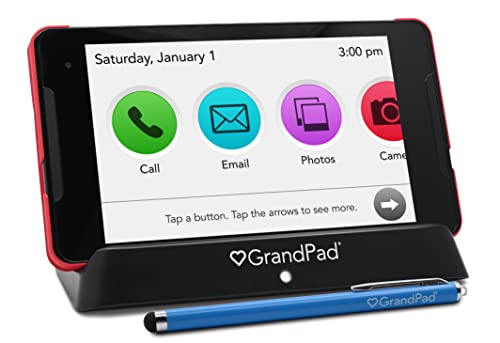
6. GrandPad Senior Tablet
Best For: Older adults and their families who want a secure, simplified tablet experience with managed connectivity

Product Highlights:
- 8″ Full HD display at 1920 x 1200
- 4GB storage
- Large icons and simplified navigation interface
- Private network blocking spam and scams
- Voice and video calling, photo sharing, multiplayer games
- Curated music and custom content library
- Grandie virtual companion feature
- 911 calling available with select plans
- Family companion apps for Android and iOS
- U.S.-based customer care
- Requires activation and monthly/annual plan
The GrandPad is unlike every other device in the best tablets under $400 guide — it’s not evaluated on processor benchmarks or display refresh rates. Its value is measured entirely by how well it serves its intended user: older adults who find mainstream smartphones and tablets unnecessarily complex, overwhelming, or vulnerable to online fraud. The simplified interface with large icons, a private managed network that blocks scams, and integrated family connectivity apps solve real problems that no general-purpose tablet addresses properly. The companion app for family members allows photo and video sharing in a controlled environment. The Grandie virtual companion adds engagement features specifically designed for seniors. The subscription model is worth understanding upfront — functionality is significantly limited without an active plan. For families evaluating the best tablets under $400 for a senior loved one, GrandPad serves a purpose nothing else in this guide can replicate.
Reasons to Buy:
- Specifically designed for seniors — large icons, simple navigation, no overwhelming complexity
- Private network actively blocks spam and scams — a genuine safety feature
- Family companion app creates a managed, secure sharing environment
- U.S.-based customer support adds accessibility and reliability
Reasons to Avoid:
- Requires ongoing subscription plan — not a one-time purchase
- Not compatible with Consumer Cellular — carrier restriction limits flexibility
- 4GB storage is extremely limited by current standards
- Limited functionality without an active plan — confirm plan costs before purchasing
7. Microsoft Surface Go 3
Best For: Users who want the most portable Windows 11 2-in-1 experience with a compact footprint

Product Highlights:
- 10.5″ Full HD+ display at 1920 x 1280, 220 PPI
- Intel Pentium Gold processor
- 4GB RAM + 64GB eMMC storage
- Windows 11 pre-installed
- Up to 11 hours battery life with fast charging
- USB-C, headphone jack, Bluetooth 5.0, MicroSDXC card reader
- Adjustable kickstand
- 1.2 pounds starting weight
- Surface Pen and Type Cover sold separately
The Microsoft Surface Go 3 makes the best tablets under $400 list as the most portable Windows 11 device at this price point. At 1.2 pounds with a 10.5-inch display, it travels lighter than any laptop alternative while still running a full desktop OS. For students who need Windows software compatibility — specific educational platforms, Microsoft Office without workarounds, institution-required applications — the Surface Go 3 provides that in a genuinely pocketable form. The 220 PPI display is sharp for a 10.5-inch panel, and the adjustable kickstand makes desk and lap use practical. Battery life of up to 11 hours is solid for a Windows device. The Intel Pentium Gold is honest about its positioning — this is not a power machine. Heavy multitasking, video editing, and demanding applications will expose its limitations. But for the best tablets under $400 that prioritize Windows portability over raw performance, it hits its target audience well.
Reasons to Buy:
- Most portable Windows 11 2-in-1 in the best tablets under $400 category
- Full Windows 11 with complete software compatibility
- MicroSDXC slot partially offsets the limited 64GB base storage
- Up to 11 hours battery life is strong for a Windows tablet
Reasons to Avoid:
- Intel Pentium Gold is noticeably limited under heavy workloads
- 4GB RAM restricts multitasking capability meaningfully
- Type Cover and Surface Pen cost extra — real purchase price rises significantly
- 64GB eMMC fills quickly for Windows users with apps and system files
8. Apple iPad Pro 12.9″ 128GB 4G (Renewed)
Best For: Apple ecosystem users who want a premium large-format iPad experience at a significantly reduced entry price

Product Highlights:
- 12.9″ Retina display at 2732 x 2048
- Apple A-series processor
- 4GB RAM + 128GB storage
- 4G LTE connectivity
- iPadOS with Apple ecosystem integration
- Renewed condition — inspected and tested by Amazon-qualified suppliers
- Minimum 90-day supplier-backed warranty
- Generic packaging and accessories
A renewed Apple iPad Pro 12.9″ entering the best tablets under $400 category represents a value proposition that is hard to dismiss for committed Apple users. The 12.9-inch Retina display at 2732 x 2048 remains among the finest tablet panels available regardless of age — Apple’s display calibration has long set the standard. iPadOS delivers a software experience with genuine desktop-class application support through apps like Procreate, LumaFusion, and the full Microsoft 365 suite. The 4G LTE variant adds mobile connectivity that most tablets in the best tablets under $400 guide lack. The honest considerations: renewed units carry condition variability, battery health should be specifically investigated before purchase, and the 90-day warranty is shorter than new device coverage. Apple Pencil and Smart Keyboard compatibility require additional investment. For buyers comfortable with the renewed market and invested in the Apple ecosystem, this is a legitimate way to access premium iPad hardware within the best tablets under $400 budget.
Reasons to Buy:
- 12.9″ Retina display remains exceptional regardless of generation
- Apple ecosystem integration — iCloud, AirDrop, Apple Pencil, Smart Keyboard compatible
- 4G LTE adds mobile connectivity absent in most best tablets under $400 alternatives
- iPadOS delivers genuinely desktop-class app experiences
Reasons to Avoid:
- Renewed condition means battery health and cosmetic wear vary — verify before buying
- Only 90-day warranty — significantly shorter than new device coverage
- Apple Pencil and Smart Keyboard cost extra — effective price rises considerably
- Older A-series chip may face iPadOS compatibility limitations in future updates
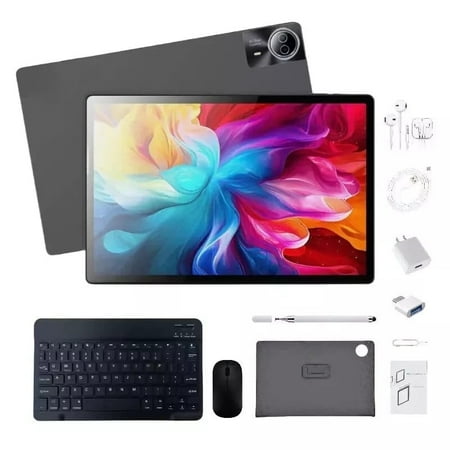
9. 14-Inch Android 14 Deca-Core Tablet (1TB / 16GB)
Best For: Large-screen power users who want maximum storage and a comprehensive accessories bundle

Product Highlights:
- 14″ UHD display at 3840 x 2160 (4K), 5-point capacitive multi-touch
- Deca-core processor up to 2.5GHz
- 16GB RAM + 1TB internal storage
- Android 14
- WiFi, Bluetooth, FM, SIM card phone call function
- 2G, 3G, 4G LTE, 5G network support
- 12,900mAh battery, up to 11 hours usage
- 24MP rear camera, 16MP front camera
- Full accessories bundle: keyboard, mouse, earphones, stylus, case, leather case, OTG adapter, fast charging head
On paper, the 14-inch Android 14 Deca-Core tablet presents an extraordinary specification package within the best tablets under $400 category. A 4K UHD display, 16GB RAM, 1TB storage, 12,900mAh battery, and a comprehensive accessory bundle represent a value density that no established brand can match at this price. The honest assessment required here is that unverified brands with claimed 4K displays and Deca-core processors at this price point frequently involve marketing inflation — 4K on a tablet at this budget warrants independent verification. The accessories bundle adds practical value regardless. For buyers who understand the brand risk involved and are primarily drawn to the large screen, generous storage, and accessory completeness, this device serves as a budget entertainment and productivity platform. Approach with calibrated expectations and verify Widevine L1 support before purchasing for streaming purposes.
Reasons to Buy:
- 1TB internal storage and 16GB RAM are exceptional specifications for the price
- Full accessories bundle removes additional purchase requirements
- 12,900mAh battery provides strong all-day usage capacity
- 5G + 4G LTE multi-band support adds connectivity flexibility
- 14-inch screen offers immersive large-format viewing
Reasons to Avoid:
- Brand reliability and long-term software support are unverified
- 4K display claims on budget hardware should be independently confirmed
- Deca-core processor identity and actual performance benchmarks are unclear
- Limited customer support infrastructure compared to established brands
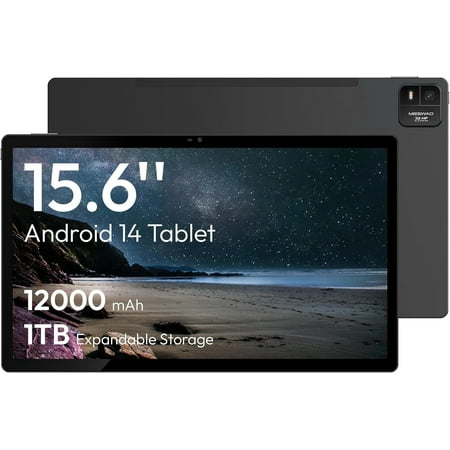
10. MESWAO 15.6-Inch Android 14 Tablet
Best For: Users who want the largest possible screen for home entertainment, movie watching, and light productivity

Product Highlights:
- 15.6″ Full HD IPS display at 1920 x 1080
- MediaTek Helio G99 (6nm) octa-core processor, up to 2.2GHz
- 6GB RAM + 128GB storage, expandable to 1TB via TF card
- 12,000mAh battery
- Android 14 OS
- 32MP rear camera with flash, 5MP front camera
- Suitable for movies, streaming, and light office work
- Space Gray finish
The MESWAO 15.6-inch tablet occupies a genuinely uncommon position among the best tablets under $400 — a 15.6-inch Android tablet is unusual hardware, and for the right user, it solves a real problem. If your primary tablet use case involves watching movies, attending video lectures, working from a home desk, or consuming long-form content, 15.6 inches of screen real estate creates an experience that no 10 or 11-inch tablet can replicate. The Helio G99 on a 6nm process is a credible mid-range processor — capable for streaming, document work, and casual gaming without thermal concerns. The 12,000mAh battery is well-sized for a screen this large. The honest limitation is portability — at 15.6 inches, this is functionally a home device, not something you carry in a bag. For buyers evaluating the best tablets under $400 primarily for stationary home entertainment, the MESWAO fills its niche with more capable hardware than its price suggests.
Reasons to Buy:
- 15.6-inch display is uniquely large among the best tablets under $400 options
- Helio G99 6nm processor delivers reliable performance for its use case
- 12,000mAh battery provides extended viewing sessions without interruption
- 1TB microSD expandability removes storage concerns entirely
- 32MP rear camera is above average for a tablet at this price
Reasons to Avoid:
- 15.6 inches is not portable — functionally a home-only device
- 6GB RAM may feel constrained with heavy app multitasking over time
- Brand support and long-term update commitment are limited
- 1080p on a 15.6-inch panel results in lower pixel density than smaller competitors
Model Comparison Table
| Model | Display | Processor | RAM / Storage | OS | Best For |
|---|---|---|---|---|---|
| Samsung Galaxy Tab S10 FE | 10.9″ IPS 90Hz | Exynos 1580 | 8GB / 128GB | Android 15 | All-around students, S Pen users |
| Lenovo Idea Tab Pro 12.7″ | 12.7″ 3K LCD 90Hz | Dimensity 8300 | 8GB / 128GB | Android 14 | Students, gamers, creatives |
| Xiaomi Pad 7 | 11.2″ 3.2K 144Hz | Snapdragon 7+ Gen 3 | 8GB / 128GB | Android 14 HyperOS | Display-first buyers, media |
| Lenovo Smart Tab P10 | 10.1″ FHD IPS | Snapdragon | 4GB / 64GB | Android | Smart home, Alexa users |
| Microsoft Surface Pro 3 | 12″ PixelSense | Intel Core i3 | 4GB / 128GB | Windows 10/11 | Windows legacy users |
| GrandPad Senior Tablet | 8″ FHD | — | 4GB | Proprietary | Seniors, family connectivity |
| Microsoft Surface Go 3 | 10.5″ FHD+ | Intel Pentium Gold | 4GB / 64GB | Windows 11 | Portable Windows, students |
| Apple iPad Pro 12.9″ (Renewed) | 12.9″ Retina | Apple A-series | 4GB / 128GB | iPadOS | Apple ecosystem, pro display |
| 14″ Android Deca-Core Tablet | 14″ UHD 4K | Deca-core 2.5GHz | 16GB / 1TB | Android 14 | Large screen power users |
| MESWAO 15.6″ Android 14 | 15.6″ FHD IPS | Helio G99 Octa-core | 6GB / 128GB | Android 14 | Entertainment, large screen |
How to Choose the Best Tablets Under $400 for Your Needs
For Students and Academic Use
The best tablets under $400 for students split between two clear recommendations. The Samsung Galaxy Tab S10 FE delivers the most polished all-around student experience with S Pen integration, One UI 7, and Android 15. The Lenovo Idea Tab Pro 12.7″ wins on display size, audio quality, and AI study features — particularly relevant for students who attend video lectures and use Google Gemini regularly.
For Display and Media Quality
If screen quality is your single deciding factor, the Xiaomi Pad 7 leads the best tablets under $400 category unambiguously. The 3.2K 144Hz display with Snapdragon 7+ Gen 3 processing and Dolby Vision support creates the best visual experience available at this price point. No Android alternative in this guide matches it on display specification.
For Windows Productivity
The Microsoft Surface Go 3 is the most portable Windows 11 option in the best tablets under $400 guide. The Surface Pro 3 offers a larger display and Core i3 processing for users who need more power. Both require Type Cover and Surface Pen purchases to reach their full potential — factor that into your total budget.
For Senior Users
The GrandPad is the only device in the best tablets under $400 guide built specifically for older adults. Its simplified interface, fraud protection, and family connectivity features serve a purpose that no general-purpose tablet addresses. The subscription model should be budgeted alongside the device cost.
For Large Screen Home Entertainment
Between the 14-inch Deca-Core tablet and the MESWAO 15.6-inch, buyers choosing for pure screen size should evaluate brand comfort. The MESWAO’s Helio G99 processor is a more verifiable hardware choice. The 14-inch option offers more storage and a larger accessories bundle but carries higher brand uncertainty.
For Apple Ecosystem Users
The renewed Apple iPad Pro 12.9″ is the only way to access Apple’s premium large-format display and iPadOS experience within the best tablets under $400 budget. Battery health and condition verification are essential steps before committing to a renewed purchase.
Key Buying Considerations for the Best Tablets Under $400
Software Update Longevity
A device shipping with Android 15 or Windows 11 today will remain security-current and feature-relevant longer than one running an older OS. Samsung’s update track record for Fan Edition devices and Lenovo’s published update commitments make them safer long-term investments among the best tablets under $400.
Widevine L1 Streaming Certification
Always confirm Widevine L1 support before purchasing the best tablets under $400 for streaming purposes. L3-certified devices cap Netflix and Amazon Prime Video at 480p — a significant quality limitation that marketing materials rarely highlight clearly.
Accessories and True Total Cost
The Surface Go 3 and Surface Pro 3 both require Type Cover and Surface Pen purchases to function as intended 2-in-1 devices. The Lenovo Idea Tab Pro and Xiaomi Pad 7’s 45W charger situation (not included) are similar hidden costs. Evaluate the total purchase cost, not just the device price, when comparing the best tablets under $400.
Processor Transparency
Deca-core processor claims from unknown brands in the best tablets under $400 space are difficult to verify against real-world performance. Established chipsets — Snapdragon 7+ Gen 3, Dimensity 8300, Exynos 1580, Helio G99 — have published benchmarks and user reviews that allow meaningful performance comparison.
Battery Degradation in Renewed Devices
The Apple iPad Pro renewed listing carries a 90-day warranty. Battery health in used devices can vary significantly. For any renewed purchase in the best tablets under $400 category, request battery health information and understand the return window before committing.
Conclusion
The best tablets under $400 category delivers genuine hardware quality across a broader range of use cases than any other budget tier. From Samsung’s polished S Pen experience and Lenovo’s premium student display to Xiaomi’s exceptional screen quality and Microsoft’s portable Windows options, the best tablets under $400 space has a credible answer for nearly every buyer type.
For most users, the Samsung Galaxy Tab S10 FE and Lenovo Idea Tab Pro 12.7″ represent the strongest all-around value in the best tablets under $400 guide — both combining capable hardware with strong software support and useful included accessories. The Xiaomi Pad 7 is the pick for buyers who refuse to compromise on display quality, while the Microsoft Surface Go 3 remains the best portable Windows option at this price.
The best tablets under $400 purchase that serves you well for three years is worth more than a cheaper option that needs replacing in one. Use this guide to match the right device to your actual workflow — and every recommendation here will earn its place in your daily routine.
