

What is RCS? RCS stands for Rich Communication Services — a modern messaging protocol designed to replace the ageing SMS standard that has powered text messaging since the early 1990s. Where SMS is limited to plain text and basic functionality, RCS brings read receipts, typing indicators, high-resolution media sharing, group chats, and end-to-end encryption into your default messaging app.
What is RCS in practical terms? Think of it as SMS rebuilt from the ground up to compete with WhatsApp, iMessage, and Telegram — except it works through your phone’s native messaging app without needing a separate download or account.
Google has been the primary driver behind RCS adoption on Android, integrating it directly into Google Messages. Understanding what RCS is and how it works matters more now than ever, because it’s actively changing how Android users communicate every day.
What Is RCS and How Does It Actually Work?
RCS operates through your mobile carrier’s data network or Wi-Fi rather than the traditional cellular SMS channel. When both sender and recipient have RCS enabled, messages travel as data packets — similar to how WhatsApp or Signal work — rather than through the older SS7 telephone network used by SMS.
The key difference is that RCS doesn’t require a third-party app. It runs inside your existing messaging app, primarily Google Messages on Android. No account creation, no app download, no separate login. If your carrier supports it and you have Google Messages installed, RCS activates automatically in the background.
What is RCS capable of technically? It operates on the Universal Profile standard set by the GSMA — the global mobile industry body — which ensures cross-carrier and cross-device compatibility. This standardisation is what separates RCS from previous attempts at advanced messaging that were locked to single networks or manufacturers.

How RCS Differs From SMS at a Technical Level
SMS sends messages through a signalling channel originally designed for network control data. It has a 160-character limit per message, no delivery confirmation beyond a basic sent indicator, no support for typing indicators, and compresses images aggressively before sending.
RCS uses an internet-based delivery system that removes all of those constraints. Messages can be any length. Images and videos send at full resolution. The protocol supports group conversations with proper admin controls, location sharing, audio messages, and interactive features like suggested replies.
When the recipient isn’t on RCS — either because their carrier doesn’t support it or they’re using an iPhone — the message automatically falls back to SMS. The transition is seamless and happens without any action from the user.
RCS and End-to-End Encryption
Google added end-to-end encryption to RCS conversations in Google Messages, but this applies specifically to one-on-one conversations between Google Messages users. Group chats gained end-to-end encryption support later, though the rollout has been gradual.
It’s worth understanding that encryption in RCS isn’t part of the base GSMA Universal Profile standard — it’s an addition Google implemented on top. This means RCS through other apps or carriers may not carry the same encryption guarantees. For sensitive conversations, knowing whether encryption is active (indicated by the lock icon in Google Messages) matters.
RCS vs SMS vs iMessage: Full Comparison
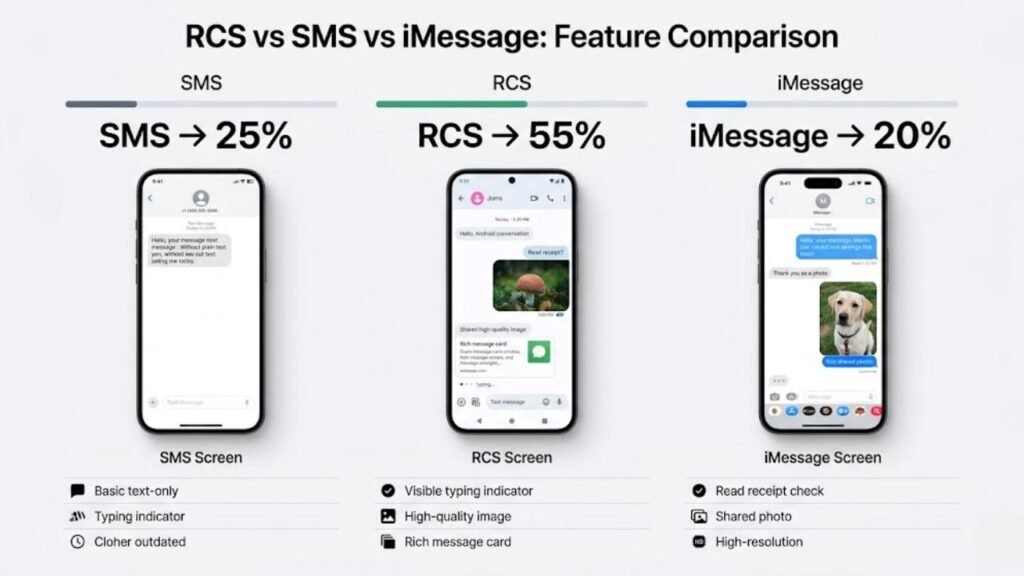
| Feature | RCS | SMS | iMessage |
|---|---|---|---|
| Read Receipts | ✅ Yes | ❌ No | ✅ Yes |
| Typing Indicators | ✅ Yes | ❌ No | ✅ Yes |
| High-Res Photo Sharing | ✅ Yes | ❌ No | ✅ Yes |
| Video Sharing | ✅ Full quality | ❌ Compressed | ✅ Full quality |
| Group Chat Controls | ✅ Yes | ⚠️ Basic | ✅ Yes |
| End-to-End Encryption | ✅ Google Messages | ❌ No | ✅ Yes |
| Works Without Internet | ❌ No (falls back to SMS) | ✅ Yes | ❌ No |
| Requires App Download | ❌ No | ❌ No | ❌ No (Apple only) |
| Cross-Platform (Android/iPhone) | ⚠️ Limited | ✅ Yes | ❌ Apple only |
| Carrier Required | ✅ Yes | ✅ Yes | ❌ No |
The comparison table above clarifies something that confuses many users. RCS sits between SMS and dedicated messaging apps in terms of capability. It’s more powerful than SMS but currently more limited in cross-platform reach than WhatsApp or Signal, which work identically regardless of device or carrier.
What Is RCS Support Like on iPhones?
For years, Apple refused to support RCS, keeping iPhone users locked to SMS when messaging Android users. That changed with iOS 18, released, when Apple added RCS support to the native Messages app on iPhone.
This was a significant shift. What is RCS now capable of between Android and iPhone users? With both sides supporting the protocol, Android-to-iPhone conversations can now include higher-resolution images, better group chat management, and typing indicators — features that were previously unavailable across platforms.
However, Apple has not adopted Google’s end-to-end encryption layer for RCS. Cross-platform RCS conversations between Android and iPhone currently lack encryption. For fully private cross-platform messaging, a dedicated app like Signal remains the better choice.

Common Mistakes People Make About RCS
Assuming RCS works automatically everywhere.
What is RCS availability actually like? It depends on your carrier. Not every mobile network has fully deployed RCS infrastructure. In some regions and on some networks, RCS remains unavailable or only partially supported. Check your carrier’s support page if you’re unsure.
Thinking RCS replaces WhatsApp or Signal.
RCS is a carrier-based messaging standard, not a standalone app. What is RCS not? It’s not a replacement for dedicated encrypted messaging platforms. For group coordination, cross-country messaging on varied networks, or guaranteed encryption, dedicated apps still hold advantages.
Confusing RCS features with carrier-specific extras.
Some carriers add their own RCS-based services with proprietary features. These are built on top of RCS but aren’t part of the universal standard. Features available from one carrier may not appear when messaging someone on a different network.
Not checking whether encryption is active.
Many users assume RCS is always encrypted. What is RCS encryption status? Look for the lock icon next to the send button in Google Messages. No lock icon means the conversation is not encrypted — either because the recipient isn’t using Google Messages or group encryption isn’t active.
Disabling RCS without realising the consequences.
Some users turn off RCS in settings to troubleshoot other issues and forget to re-enable it. Without RCS, all messages revert to SMS — losing read receipts, media quality, and typing indicators immediately.
Practical Tips to Get the Most From RCS
Confirm RCS is active in Google Messages settings.
Open Google Messages, tap your profile picture, go to Messages Settings, then tap RCS chats. Toggle it on if it isn’t already. You’ll see a confirmation once your carrier activates the feature on your account.
Use RCS for media sharing instead of WhatsApp when possible.
What is RCS most useful for day to day? Sending photos and videos without compression is one of its strongest advantages. When both parties are on Android with Google Messages, RCS delivers media at the quality you actually captured it.
Pay attention to the chat bubble colour.
In Google Messages, RCS conversations show a slightly different send button and interface compared to SMS fallback. Familiarising yourself with these visual cues tells you instantly what protocol a conversation is using.
Enable chat features on a new device after switching phones.
When you move to a new Android phone, RCS doesn’t always activate automatically on the first day. Go into Google Messages settings and manually enable RCS chats if messages are defaulting to SMS after a device switch.
Keep Google Messages updated.
Google regularly improves RCS functionality through Play Store updates to Google Messages. Running an outdated version can cause features to disappear or connections to drop. Check for updates monthly if you use RCS daily.
Frequently Asked Questions
What is RCS messaging on Android?
RCS is a modern messaging standard built into Google Messages that replaces SMS with features like read receipts, typing indicators, high-res media sharing, and encryption.
Does RCS work between Android and iPhone?
Yes, since iOS 18, iPhones support RCS. However, end-to-end encryption is not currently active for Android-to-iPhone RCS conversations.
Is RCS free to use?
RCS messages use your data connection rather than your SMS allowance. If you’re on Wi-Fi or have a data plan, there’s no extra charge. Standard data rates apply if you’re on mobile data without an unlimited plan.
Why is my RCS not working?
The most common reasons are carrier support gaps, an outdated Google Messages app, or RCS being disabled in settings. Check all three before assuming a network fault.
What is RCS end-to-end encryption and who gets it?
Google Messages applies end-to-end encryption to one-on-one RCS conversations between users on Google Messages. A lock icon next to the send button confirms encryption is active.
Can I use RCS without Google Messages?
RCS support is available in some other Android messaging apps, but Google Messages provides the most complete and consistently updated RCS implementation on Android currently.
Conclusion
What is RCS at its core? It’s the most significant upgrade to mobile messaging infrastructure in over three decades — and it’s happening quietly in the background of an app most Android users already have installed.
The arrival of iPhone support in iOS 18 removed the biggest barrier to RCS becoming a genuinely universal standard. Cross-platform messaging between Android and iPhone users is now meaningfully better than it was two years ago, even if full encryption across platforms still needs work.
For Android users specifically, enabling RCS in Google Messages takes under a minute and immediately improves every conversation with other Android users. The features aren’t gimmicks — read receipts, full-quality media, and reliable group chats are things people use every single day.
SMS served its purpose for thirty years. RCS is what comes next, and it’s already here.
