

The Smartphone Display Stack is the unseen engineering marvel that determines how your device renders colors, responds to touch, and delivers immersive visuals. Every Android smartphone, whether it’s a flagship from Samsung Electronics or a mid-range Xiaomi device, relies on a precise arrangement of layers to deliver a smooth user experience.
Understanding the Smartphone Display Stack goes beyond knowing about OLED or LCD panels. It explains why some displays are brighter, more responsive, or more energy-efficient than others. Each layer, from the protective glass to the backlight or organic emitters, contributes to the overall visual performance and touch accuracy.
This guide dives into the detailed structure of modern smartphone displays, exploring the function of each layer, technological variations, practical impacts on device performance, and tips for maintenance. By the end, you’ll have a complete understanding of how your device’s screen truly works.
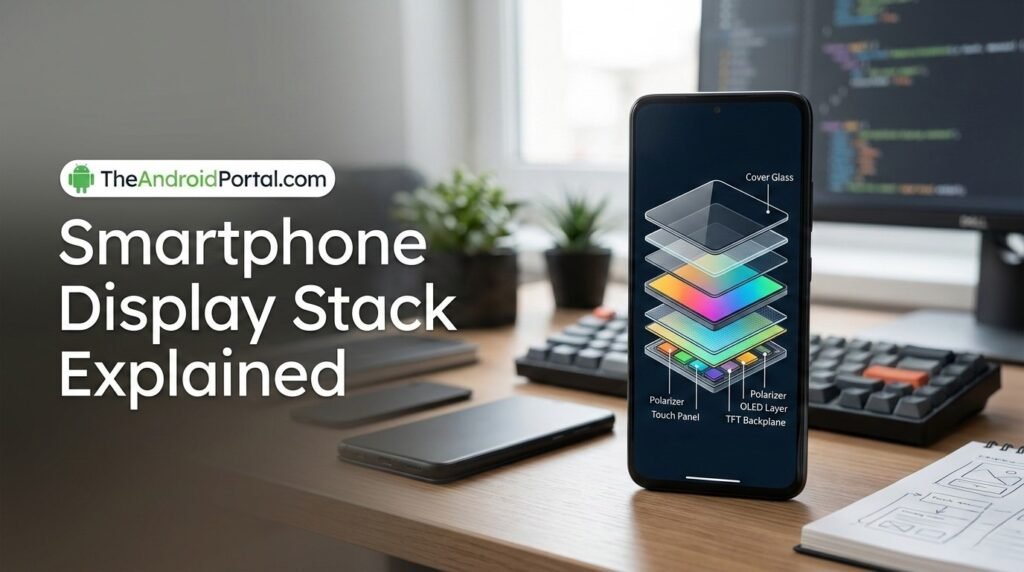
What Is a Smartphone Display Stack?
The Smartphone Display Stack refers to the multi-layered structure that makes up the visible screen of your device. Each layer serves a distinct purpose, from protection and touch sensitivity to light emission and color reproduction.
Core purposes of a display stack:
- protect the display from scratches and impact
- accurately register touch input
- deliver clear and vibrant visuals
- optimize energy efficiency
- maintain durability and reliability
Modern smartphones integrate these layers with precision to ensure the best combination of durability, responsiveness, and visual quality.
Key Layers of a Smartphone Display Stack
This YouTube video below explains common smartphone stack problems, including devices that keep turning on and off. It covers troubleshooting steps and solutions to fix these recurring issues for smoother phone performance. 📱⚡✨
Modern smartphone screens, especially AMOLED and LCD types, have multiple layers stacked precisely for function and efficiency. The primary layers include:
1. Cover Glass
- The outermost layer protecting the display from scratches and impacts.
- Often made of chemically strengthened glass like Corning Gorilla Glass.
- Provides smooth touch interaction and a clear viewing surface.
2. Touch Sensor Layer
- Detects finger gestures and stylus input.
- Can be integrated within the display (on-cell or in-cell technology) or a separate layer (add-on touch panel).
- Supports multi-touch, pressure sensitivity, and gestures like pinch-to-zoom.
3. Polarizer and Anti-Reflective Films
- Reduce glare from sunlight and ambient lighting.
- Enhance contrast and readability in bright environments.
- Some layers include anti-fingerprint coatings to maintain clarity.
4. Display Panel (OLED/LCD)
- Core layer generating images.
- LCDs rely on a backlight, liquid crystals, and color filters.
- AMOLED/OLED panels have organic emitters that produce light directly, enabling deeper blacks and better energy efficiency.
5. Backlight Unit (for LCDs)
- Provides illumination for LCD panels since liquid crystals don’t emit light.
- Composed of LED arrays, diffusers, and reflective layers.
- Often coupled with local dimming zones for better contrast.
6. Optical Adhesives
- Bond layers together, eliminating air gaps.
- Improve optical clarity and reduce reflections.
- Maintain structural integrity across temperature changes.
7. Polarizing/Anti-Blue Light Films
- Some devices include additional films to reduce eye strain.
- Modify light emission angles for better comfort and readability.
AMOLED vs LCD: How Stack Differences Affect Performance
This YouTube video below explains the differences between AMOLED and LCD displays, covering aspects like brightness, color accuracy, power consumption, and durability. It helps viewers understand which screen technology may be better for their needs. 📱✨
The composition of the Smartphone Display Stack differs significantly between LCD and AMOLED screens.
| Feature | LCD Stack | AMOLED Stack |
|---|---|---|
| Light Source | Backlight LED | Self-emissive organic layers |
| Black Levels | Limited, depends on backlight | True blacks, each pixel off |
| Layer Complexity | More layers due to backlight | Fewer layers, thinner profile |
| Energy Efficiency | Higher energy for dark images | Lower energy for dark images |
| Touch Integration | On-cell or add-on layer | Often in-display |
| Color Accuracy | High with calibration | Vivid, sometimes oversaturated |
These differences explain why some devices feel brighter, thinner, or more responsive than others.
How Display Stack Affects Touch Responsiveness
The Smartphone Display Stack plays a crucial role in how your device responds to input.
Factors affecting touch performance:
- Glass hardness – overly thick or curved glass can reduce responsiveness
- Sensor placement – in-cell vs. add-on affects latency
- Layer adhesive – optical bonding reduces signal delay
- Environmental conditions – humidity or temperature may impact capacitive sensing
Devices like the Apple iPhone 15 and Samsung Galaxy S23 use advanced touch layers to maintain high refresh rates (120Hz or higher) without lag.
Color Reproduction and Visual Quality
Each layer of the display stack contributes to visual accuracy.
Key contributors:
- OLED emitters or LCD pixels – determine base color reproduction
- Polarizers and films – reduce reflection and glare
- Optical adhesive layers – minimize light scattering
- Software calibration – compensates for slight variations in layer thickness
High-end smartphones often include adaptive color management, adjusting colors for ambient lighting while maintaining accuracy.
Brightness and Energy Efficiency
The design of the display stack also affects brightness and battery life.
- AMOLED panels: Energy-efficient when displaying darker content since black pixels are off.
- LCD panels: Require constant backlight, higher power consumption for dark images.
- Layer bonding and anti-reflective coatings can improve brightness perception without increasing energy use.
Durability and Repair Considerations
Layered construction impacts repairability.
- Glass replacement: Easy if only the cover glass cracks
- OLED burn-in: Caused by organic layers degrading over time
- LCD backlight failure: Requires replacing entire panel
- Optical adhesive separation: Can lead to visible air gaps or reduced clarity
Understanding the stack helps users and technicians diagnose and repair display issues efficiently.
Advanced Technologies in Display Stacks
Modern smartphones integrate specialized layers for enhanced experience:
- Under-display fingerprint sensors – require transparent conductive layers
- High refresh rate panels (120Hz/144Hz) – need optimized touch layers and adhesives
- Foldable screens – flexible OLED layers, ultra-thin protective films
- HDR10+ support – precise control of pixel brightness and backlight dimming zones
Troubleshooting Common Display Issues
| Issue | Likely Layer | Solution |
|---|---|---|
| Screen unresponsive | Touch sensor layer | Restart, recalibrate, or replace |
| Dull colors | Polarizer / OLED emitters | Calibration, software update |
| Flickering | Backlight or adhesive layer | Professional repair |
| Burn-in | OLED organic layer | Reduce static content, screen savers |
| Cracks | Cover glass | Glass replacement |
Tips to Maintain Smartphone Display Health
- Avoid direct sunlight for prolonged periods
- Use screen protectors compatible with touch layers
- Keep firmware updated for software touch optimizations
- Avoid exposing foldable displays to stress at fold points
- Calibrate color and brightness settings for your environment
Frequently Asked Questions
1. What is a smartphone display stack?
A Smartphone Display Stack is the layered structure of glass, touch sensors, display panels, adhesives, and films that make up the visible screen.
2. How does stack affect touch responsiveness?
Layers like the touch sensor, glass thickness, and adhesive influence latency and accuracy of touch input.
3. Why do AMOLED displays appear thinner than LCDs?
AMOLED displays are self-emissive, eliminating the need for a backlight layer present in LCD stacks.
4. Can a display stack cause screen burn-in?
Yes. OLED layers are susceptible to burn-in if static images are displayed for long periods.
5. How can I improve display longevity?
Use protective films, avoid high temperatures, and keep software up to date to optimize touch and visual performance.
Last Words
The Smartphone Display Stack is an intricate engineering design that defines user experience, visual quality, and durability. From the outer glass to the inner emissive layers, every component contributes to touch responsiveness, color accuracy, brightness, and energy efficiency. By understanding how these layers interact, users and technicians can better appreciate, maintain, and optimize their devices for long-term performance.
